Deep Dive: Multi-Agent Systems — Architectures, Coordination Patterns, Best Practices, and Pitfalls
The single ReAct agent handles an impressive range of tasks — but it has a ceiling. When a task spans multiple domains, requires different expertise for different phases, or benefits from verification and review, a single LLM with a single system prompt starts to buckle. The solution is not a bigger model or a longer context window — it’s multiple specialized agents working together.
This post is a deep dive into multi-agent systems: what they are, how they’re architected, the coordination patterns that make them work, the best practices that keep them reliable, the common mistakes that make them fail, and the real-world systems that prove they work at scale.
1. What Is a Multi-Agent System?
A multi-agent system is an AI architecture where two or more LLM-powered agents — each with its own role, system prompt, tools, and constraints — collaborate to solve a task that exceeds the practical capabilities of a single agent. Each agent is a self-contained ReAct loop (Thought → Action → Observation), and an orchestration layer coordinates them: deciding which agent runs, when, with what context, and how results flow between them.
Unlike a single ReAct agent where one LLM makes all decisions, a multi-agent system distributes decision-making across specialized units:
- Specialization — Each agent is an expert in one domain with a focused system prompt and scoped tools.
- Coordination — An orchestrator (which may or may not be an LLM itself) manages task decomposition, routing, and result aggregation.
- Isolation — Each agent operates in its own context window, preventing prompt contamination and context overflow.
- Composability — Agents can be developed, tested, and improved independently, then composed into workflows.
“The key insight is that multi-agent architectures aren’t about having more AI — they’re about having the right AI in the right place. Specialization enables each agent to be simpler, more focused, and more reliable than a single agent trying to do everything.” — OpenAI, A Practical Guide to Building Agents, 2025
How It Differs from Other Patterns
| Pattern | LLMs | Coordination | Context | Best For |
|---|---|---|---|---|
| Single LLM call | 1 | None | One window | Simple tasks |
| Single ReAct agent | 1 | Self (loop) | One window | Multi-step, single-domain |
| Multi-agent system | 2+ | Orchestrator | Separate windows | Multi-domain, complex workflows |
The multi-agent system trades simplicity for capability. It introduces coordination overhead, but in return provides specialization, isolation, and scalability that a single agent cannot achieve.
2. Architectures and Topologies
Multi-agent systems come in several topological patterns. Choosing the right one depends on the task structure, the degree of interdependence between agents, and the need for verification.
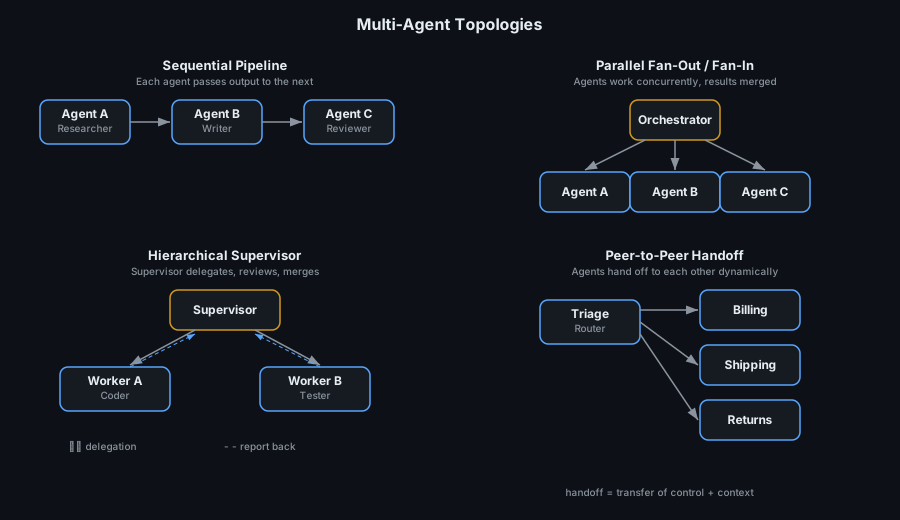
2.1 Sequential Pipeline
Agents execute in a fixed order, each passing its output to the next. This is the simplest multi-agent pattern — essentially an assembly line.
Flow: Agent A → Agent B → Agent C → Final Output
Example: Research → Write → Review pipeline. A researcher agent gathers information, a writer agent produces a draft, and a reviewer agent provides feedback.
When to use:
- Tasks with clear, non-overlapping phases.
- Each phase requires different expertise or tools.
- The output of one phase is the input to the next.
Limitations: Latency scales linearly with the number of agents. An error in an early stage propagates through the entire pipeline.
2.2 Parallel Fan-Out / Fan-In
An orchestrator sends subtasks to multiple agents simultaneously, then merges their results. This is the multi-agent equivalent of CompletableFuture.allOf() in Java.
Flow: Orchestrator → [Agent A ∥ Agent B ∥ Agent C] → Merge → Final Output
Example: A competitive analysis task where one agent researches Company A, another researches Company B, and a third researches Company C — all in parallel. The orchestrator merges the results into a comparative report.
When to use:
- Independent subtasks that don’t depend on each other.
- Latency is a concern (parallel execution is faster than sequential).
- The final output requires synthesis of multiple independent findings.
Limitations: Merge logic can be complex. If one agent fails, the orchestrator must decide whether to wait, retry, or proceed with partial results.
2.3 Hierarchical Supervisor
A supervisor agent decomposes the task, delegates subtasks to worker agents, reviews their outputs, and merges the final result. This mirrors how organizations work — managers decompose goals, delegate to specialists, and synthesize.
Flow: Supervisor ↔ Worker A, Supervisor ↔ Worker B → Supervisor merges → Final Output
Example: A software engineering supervisor that delegates coding to a coder agent and testing to a tester agent, reviews both outputs, and iterates until the code passes tests.
When to use:
- Tasks requiring quality control and iterative refinement.
- Worker agents need guidance on what to do (task decomposition is non-trivial).
- Auditability matters — the supervisor creates a clear delegation trail.
Limitations: The supervisor is a single point of failure and a bottleneck. If the supervisor LLM makes a bad decomposition decision, all downstream work is wasted.
2.4 Peer-to-Peer Handoff
Agents transfer control directly to each other based on the conversation context. There is no central orchestrator — each agent decides whether to handle the current request or hand off to a more appropriate peer.
Flow: Triage Agent → Billing Agent → (handoff) → Shipping Agent → Final Output
Example: A customer service system where a triage agent classifies the user’s intent and hands off to a billing, shipping, or returns specialist. If the billing specialist discovers the issue is actually about shipping, it can hand off directly.
When to use:
- Conversational systems where the user’s intent may shift mid-conversation.
- Each agent is a domain expert for a specific category of requests.
- Dynamic routing is needed (the path isn’t known in advance).
Limitations: Without careful design, agents can hand off in circles (Agent A → Agent B → Agent A). Requires explicit handoff protocols and depth limits.
OpenAI’s Agents SDK formalizes this pattern with first-class
Handoffobjects: “Handoffs allow agents to delegate to other agents. This is particularly useful when you have agents that are specialized in different areas.” — OpenAI Agents SDK Documentation
3. The Handoff: How Agents Transfer Control
The handoff is the fundamental coordination primitive in multi-agent systems. It is the moment where one agent passes control — and context — to another. Getting handoffs right is what separates a reliable multi-agent system from a fragile one.
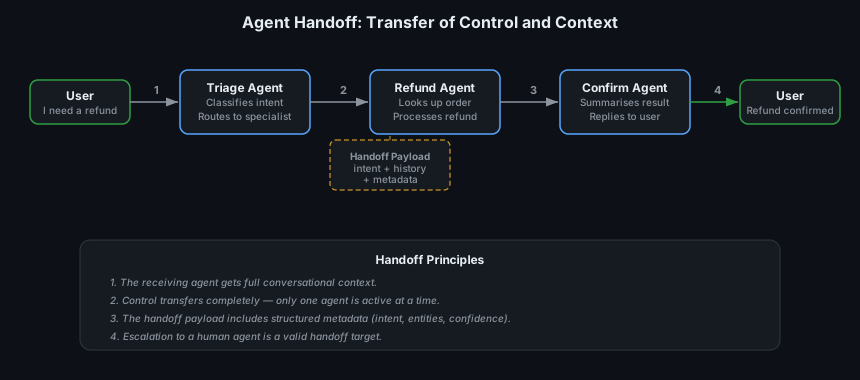
What a Handoff Contains
A well-designed handoff is not just “pass the chat history.” It includes:
| Component | Purpose | Example |
|---|---|---|
| Intent classification | What the user wants | "intent": "refund_request" |
| Extracted entities | Structured data from the conversation | "order_id": "ORD-789", "reason": "defective" |
| Conversation summary | Compressed context for the receiving agent | “Customer wants a refund for order ORD-789 due to a defective product.” |
| Full history (optional) | Raw messages for audit trail | Array of message objects |
| Metadata | Routing context | "source_agent": "triage", "confidence": 0.94 |
Handoff vs. Tool Call
A common design question: should one agent call another as a tool, or should control transfer completely?
| Approach | Control | Context | Best For |
|---|---|---|---|
| Tool call | Calling agent retains control | Calling agent sees the result | Sub-tasks where the caller needs the result to continue reasoning |
| Handoff | Control transfers to the receiving agent | Receiving agent owns the conversation | Domain transfers where the calling agent’s job is done |
OpenAI’s Agents SDK distinguishes these explicitly: tools return results to the calling agent, while handoffs replace the active agent entirely. Anthropic’s building effective agents guide uses the term “orchestrator-workers” for the tool-call pattern and “routing” for the handoff pattern.
4. Shared State Management
In a multi-agent system, agents need to share data without relying on passing entire conversation histories. A shared state store provides a structured, external memory that agents can read from and write to.
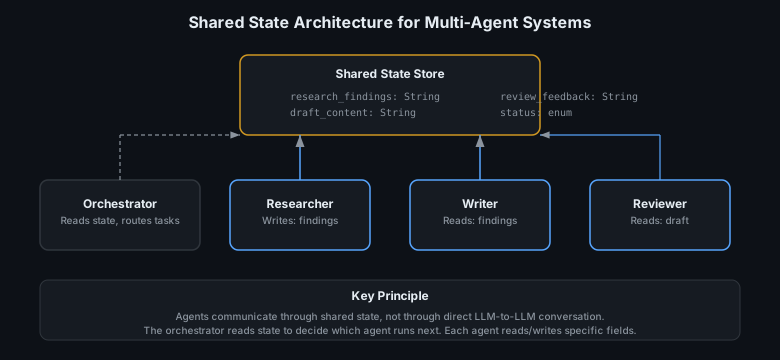
Why Shared State Matters
- Context isolation — Each agent has its own context window. Shared state lets them exchange information without stuffing everything into one window.
- Deterministic coordination — The orchestrator can check
state.statusto decide what to do next, rather than asking an LLM to figure it out. - Auditability — The state store is a structured log of what each agent contributed.
- Resumability — If an agent fails, the orchestrator can retry from the last known state instead of restarting the entire workflow.
Implementation Approaches
| Approach | Complexity | Best For |
|---|---|---|
In-memory map (Map<String, Object>) |
Low | Prototypes, single-process workflows |
| LangGraph state | Medium | Graph-based agent workflows with typed state |
| Database / Redis | Higher | Production systems, distributed agents, persistence |
LangGraph formalizes this as a typed state schema that is passed through the graph. Each node (agent) receives the current state and returns updates. The framework merges updates automatically.
// Shared state as a Java record — agents read and write specific fields
public record WorkflowState(
    String userQuery,
    String researchFindings,    // Written by Researcher, read by Writer
    String draftContent,        // Written by Writer, read by Reviewer
    String reviewFeedback,      // Written by Reviewer, read by Writer (for revision)
    WorkflowStatus status       // Read by Orchestrator for routing
) {}

public enum WorkflowStatus {
    PENDING, RESEARCHING, WRITING, REVIEWING, REVISING, COMPLETE, FAILED
}
5. Execution Trace: Seeing Multi-Agent Coordination in Action
Abstract descriptions only go so far. Here is a concrete execution trace of a multi-agent system producing a research report:
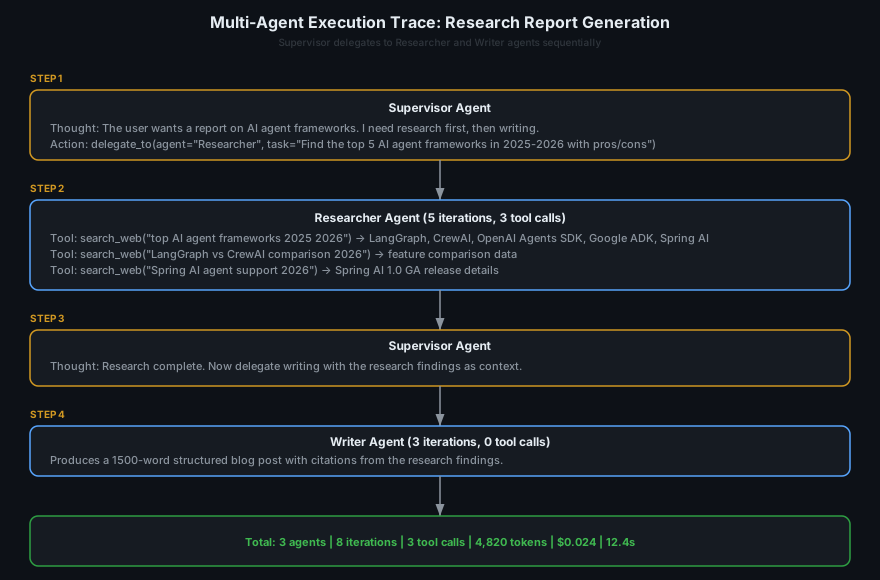
Key observations from this trace:
- Only the Researcher used tools — The Writer produced content from the research findings without needing external tool calls. Each agent used only the capabilities it needed.
- The Supervisor made routing decisions, not content — It decided who should work and when, but didn’t do the research or writing itself. This is the correct role for an orchestrator.
- Cost was modest — 4,820 tokens and $0.024 for a multi-agent workflow producing a structured report. The overhead of coordination was minimal compared to the value of specialization.
- Latency was sequential — 12.4 seconds total because the Writer waited for the Researcher. A parallel topology would have been faster if the subtasks were independent.
6. What Are Multi-Agent Systems Used For?
Multi-agent systems are the right architecture when a task exceeds the practical limits of a single agent — in domain breadth, context requirements, or need for verification.
6.1 Software Engineering Pipelines
The most mature production use case: multi-step coding workflows with planning, implementation, testing, and review.
- Devin — Cognition Labs’ autonomous software engineering agent uses a multi-agent architecture internally: a planning agent decomposes the task, a coding agent writes the implementation, and a testing agent validates the result. It achieved 13.86% on SWE-bench — a state-of-the-art result at the time.
- OpenHands (formerly OpenDevin) — Open-source platform where multiple specialized agents collaborate on software tasks, with a delegator agent coordinating browsing, coding, and terminal agents.
- Amazon Q Developer — Uses a multi-agent approach where specialized agents handle code generation, test creation, and security review as separate concerns.
6.2 Customer Service with Routing
Multi-agent systems excel at customer service where different intents require different expertise and tool access.
- Sierra AI — Builds customer experience agents for brands like WeightWatchers and SiriusXM. Uses a triage-and-handoff architecture: a routing agent classifies the customer’s intent and hands off to specialized agents for billing, shipping, returns, or technical support.
- Klarna AI — While primarily a single-agent system, Klarna’s architecture uses internal routing to specialized sub-flows — a pattern that naturally evolves toward multi-agent as complexity grows.
6.3 Research and Report Generation
Tasks that require gathering information from diverse sources, synthesizing it, and producing a structured output.
- GPT Researcher — Uses a planner agent to decompose research questions, multiple searcher agents to gather information in parallel, and a writer agent to synthesize findings into a report.
- STORM (Stanford) — A multi-agent system for writing Wikipedia-style articles. One agent generates an outline and questions, another simulates expert perspectives, and a third writes the article — producing articles rated by humans as more organized and comprehensive than single-agent outputs.
6.4 Content Creation Pipelines
Writer + editor + fact-checker workflows that mirror human editorial processes.
- Researcher → Writer → Reviewer — The classic pipeline. A research agent gathers facts and sources, a writer agent produces a draft, and a reviewer agent provides structured feedback. The writer can then revise based on review comments, creating an iterative improvement loop.
- Jasper AI — Enterprise content platform that uses specialized agents for different stages of content creation: strategy, drafting, brand voice enforcement, and compliance review.
6.5 Autonomous Computer Use
Multi-agent systems that coordinate to control software interfaces.
- Anthropic Computer Use — Claude’s computer use capability can be extended into multi-agent workflows where a planning agent decides what to do and an execution agent controls the screen.
- WebVoyager — Uses multiple agents for web navigation: a planner agent decides the navigation strategy, and an executor agent performs the clicks, typing, and scrolling.
7. Pros and Cons
Pros
-
Specialization improves reliability — Each agent has a focused system prompt and scoped tools, reducing the chance of confusion. The AutoGen paper showed that multi-agent conversation produces higher-quality outputs on complex tasks than single agents because each participant contributes its specialized expertise.
-
Separate context windows — Each agent operates in its own context window. A researcher agent can consume 50,000 tokens of search results without polluting the writer agent’s context. This eliminates the “Lost in the Middle” problem (Liu et al., 2024) that plagues long-running single agents.
-
Built-in verification — A writer + reviewer pattern provides automatic quality checks. A coder + tester pattern catches bugs before they reach the user. This redundancy is impossible with a single agent making all decisions.
-
Parallel execution — Independent subtasks can run simultaneously. A fan-out to 4 research agents completes in the time of the slowest one, not the sum of all four. For latency-sensitive applications, this is a significant advantage.
-
Independent development and testing — Each agent can be developed, unit-tested, and evaluated in isolation. When the reviewer agent underperforms, you improve it without touching the writer agent. This composability mirrors the benefits of microservices over monoliths.
-
Scalable complexity — As requirements grow, you add specialized agents rather than overloading a single agent’s system prompt. Anthropic’s building effective agents guide recommends this as the natural progression: “Start with a single agent. When it demonstrably fails due to role confusion, context limits, or task breadth — add specialization.”
Cons
-
Coordination overhead — Every handoff, state update, and routing decision is a potential failure point. A 4-agent pipeline has at least 3 handoff points, each of which can lose context, misroute, or introduce latency. The total failure probability is multiplicative, not additive.
-
Higher cost — Each agent makes its own LLM calls. A 3-agent pipeline where each agent averages 5 iterations produces 15 LLM calls — 3× the cost of a single agent doing the same task in 5 iterations. The SWE-bench analysis shows that multi-agent coding systems can consume 50–150 LLM calls per task.
-
Debugging complexity — When the final output is wrong, which agent caused the error? Was it a bad research finding, a misinterpretation by the writer, or a missed issue by the reviewer? Debugging requires tracing across multiple agent contexts — a fundamentally harder problem than debugging a single linear trajectory.
-
Latency for sequential patterns — In a sequential pipeline, each agent must wait for the previous one to complete. A 3-agent pipeline with 5 seconds per agent adds 15+ seconds of end-to-end latency, which can be unacceptable for interactive use cases.
-
Orchestration is hard to get right — The orchestrator must decide task decomposition, agent selection, error handling, and result merging. If the orchestrator is itself an LLM, it can hallucinate agent names, misroute tasks, or create circular delegation chains. If it’s deterministic code, it can’t adapt to novel situations.
-
Premature complexity — The single most common multi-agent failure is using multi-agent when a single agent would suffice. Teams frequently over-engineer, creating 4-agent pipelines for tasks that a well-prompted single agent handles perfectly. Harrison Chase of LangChain notes: “Most teams that come to us with multi-agent problems actually have a single-agent tool-design problem.”
8. When to Use Multi-Agent Systems (and When Not To)
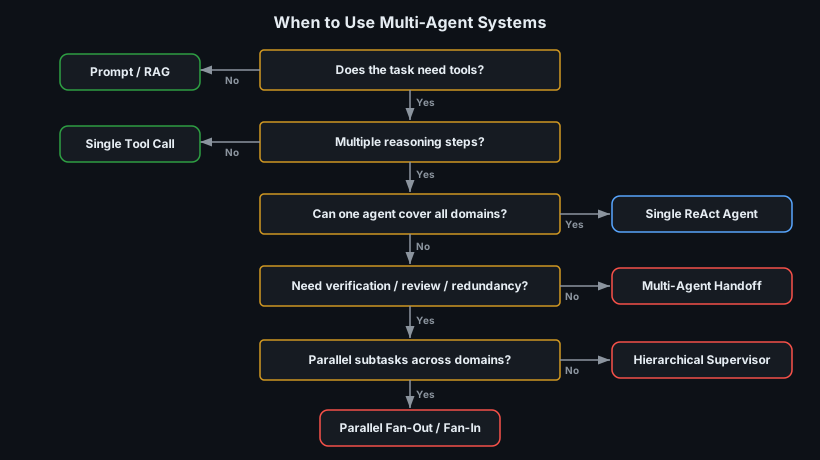
Use Multi-Agent When:
- A single agent’s system prompt exceeds ~2,000 tokens of instructions because it’s trying to cover too many roles — a sign that responsibilities should be split.
- The task spans multiple distinct domains (e.g., research + coding + testing) that require different tools and expertise.
- You need verification or review — a writer + reviewer pattern, a coder + tester pattern, or any workflow where a second opinion adds value.
- Parallel execution would significantly reduce latency — multiple independent subtasks that can run simultaneously.
- Different parts of the task require different security contexts — e.g., one agent can access customer PII while another cannot.
Don’t Use Multi-Agent When:
- A single ReAct agent with well-designed tools can handle the task. This is the case more often than teams think.
- The task is sequential and single-domain — a research question, a coding task, a customer service interaction that stays within one topic.
- You haven’t yet proven that a single agent fails on the specific task. Build the single-agent version first, measure where it breaks, and only then add agents to address specific shortcomings.
- Latency is critical and the task can’t be parallelized — multi-agent overhead will only make it slower.
“Don’t start with a multi-agent framework. Start with a single agent. When you can demonstrate with data that it fails because of context limits, role confusion, or domain breadth — then add specialization.” — Anthropic, Building effective agents, 2024
9. Best Practices
Building multi-agent systems that work reliably in production requires disciplined engineering across agent design, orchestration, observability, and failure handling. These practices are drawn from Anthropic’s building effective agents guide, OpenAI’s practical guide to building agents, and lessons from production multi-agent deployments.
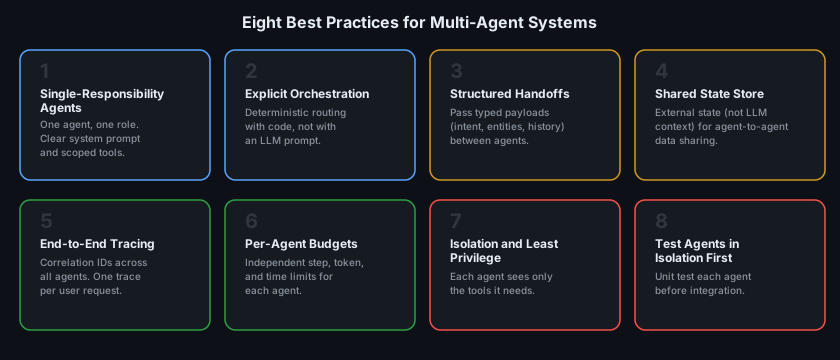
9.1 Single-Responsibility Agents
Each agent should have one role, one system prompt, and scoped tools. A “researcher” agent should not also be responsible for writing, reviewing, or routing. This mirrors the Single Responsibility Principle in software engineering — and the benefits are the same: clarity, testability, and maintainability.
Why it matters: When a single agent tries to be both a researcher and a writer, its system prompt becomes overloaded, tool selection degrades, and it’s impossible to evaluate one capability without the other. Anthropic’s guide explicitly recommends: “Keep your agents focused. A narrow agent with a clear purpose is more reliable than a broad agent trying to do everything.”
❌ One agent: "You are a research assistant AND a technical writer AND a
   fact-checker. Depending on the task phase, use the appropriate tools..."

✅ Three agents:
   - Researcher: "Find and summarise information. Use search and retrieval tools."
   - Writer: "Write clear, engaging content based on the provided findings."
   - Reviewer: "Check facts, flag unsupported claims, and suggest improvements."
9.2 Explicit Orchestration in Code
The orchestrator — the component that decides which agent runs next — should be deterministic code, not an LLM prompt, for all predictable routing decisions. Reserve LLM-based routing for genuinely ambiguous cases (like intent classification in customer service).
Why it matters: When routing is entirely LLM-driven, the orchestrator can hallucinate agent names, misclassify tasks, or create circular delegation chains. Deterministic code is testable, predictable, and fast.
// Deterministic orchestration — route based on state, not LLM decisions
public String orchestrate(WorkflowState state) {
    return switch (state.status()) {
        case PENDING      -> runResearcher(state);
        case RESEARCHING  -> state.researchFindings() != null
                             ? runWriter(state) : runResearcher(state);
        case WRITING      -> runReviewer(state);
        case REVIEWING    -> needsRevision(state.reviewFeedback())
                             ? runWriter(state) : finalise(state);
        case COMPLETE     -> state.draftContent();
        case FAILED       -> escalateToHuman(state);
    };
}
OpenAI’s practical guide to building agents distinguishes between “deterministic routing” (code-based, for known paths) and “LLM-based routing” (model-based, for ambiguous classification). Both have their place, but deterministic routing should be the default.
9.3 Structured Handoff Payloads
When one agent hands off to another, the payload should be a typed, structured object — not raw chat history. The receiving agent should get exactly the context it needs, in a format it can parse reliably.
Why it matters: Passing raw conversation history means the receiving agent must parse, filter, and interpret unstructured text to understand what happened. This is both unreliable (the LLM may misinterpret) and wasteful (filling context with irrelevant messages).
// Structured handoff payload — not raw chat history
public record HandoffPayload(
    String sourceAgent,
    String targetAgent,
    String intent,                         // Classified intent
    Map<String, String> extractedEntities, // Structured entities
    String conversationSummary,            // Compressed context
    List<Message> recentMessages,          // Last 3-5 messages for continuity
    Map<String, Object> metadata           // Confidence, timestamps, etc.
) {}

// Handoff execution
HandoffPayload handoff = HandoffPayload.of(
    "triage", "refund",
    "refund_request",
    Map.of("order_id", "ORD-789", "reason", "defective"),
    "Customer wants a refund for a defective item from order ORD-789.",
    lastNMessages(3),
    Map.of("confidence", 0.94, "timestamp", Instant.now())
);
refundAgent.handle(handoff);
9.4 Use a Shared State Store
Agents should communicate through an external shared state store, not by passing messages through the orchestrator. This decouples agents from each other and provides a single source of truth for the workflow.
Why it matters: Without shared state, the orchestrator becomes a bottleneck that must serialize and forward every piece of data between agents. Shared state lets agents read what they need directly, reduces prompt size, and enables resumability — if an agent fails, the orchestrator can retry from the last known state.
LangGraph formalizes this pattern with a typed state schema that flows through the graph. Spring AI achieves this through dependency injection — agents receive shared state beans and update them directly.
9.5 End-to-End Tracing with Correlation IDs
Every multi-agent run should be traceable from the user’s request through every agent’s reasoning steps to the final response. Assign a correlation ID at the entry point and propagate it through every agent, tool call, and handoff.
Why it matters: In a single-agent system, debugging means reading one linear trajectory. In a multi-agent system, a single user request may trigger 3+ agent runs, each with its own trajectory. Without a correlation ID linking them, debugging is a nightmare.
| What to Log | Why |
|---|---|
| Correlation ID per request | Link all agent runs for one user request |
| Agent name and role per step | Know which agent did what |
| Handoff payloads | Trace context flow between agents |
| Per-agent token count and latency | Identify bottlenecks and cost drivers |
| Per-agent outcome (success/fail/handoff) | Measure individual agent reliability |
| End-to-end outcome and total cost | Measure system-level performance |
Use platforms like LangSmith or Arize Phoenix that natively support multi-agent trace visualization — rendering the full multi-agent flow as a tree of spans.
import org.slf4j.MDC;

// Propagate correlation ID through all agents
public String runWorkflow(String userQuery) {
    String correlationId = UUID.randomUUID().toString();
    MDC.put("correlationId", correlationId);

    try {
        log.info("Workflow started: query={}", userQuery);
        String research = runAgent("researcher", userQuery);
        log.info("Researcher complete: tokens={}", lastTokenCount());
        String draft = runAgent("writer", research);
        log.info("Writer complete: tokens={}", lastTokenCount());
        String reviewed = runAgent("reviewer", draft);
        log.info("Reviewer complete: tokens={}", lastTokenCount());
        log.info("Workflow complete: total_tokens={}, total_cost={}",
            totalTokens(), totalCost());
        return reviewed;
    } finally {
        MDC.remove("correlationId");
    }
}
9.6 Per-Agent Budgets (and a Global Budget)
Set independent step, token, and time limits for each agent, plus a global budget for the entire workflow. This prevents a single runaway agent from consuming the budget of the entire system.
Why it matters: In a multi-agent system, cost and latency multiply. If each of 4 agents can make 25 iterations at 500 tokens per iteration, the theoretical maximum is 50,000 tokens — likely far more than you intend. Without per-agent budgets, a confused researcher agent can burn the entire token budget before the writer even starts.
// Per-agent and global budget configuration
record AgentBudget(int maxSteps, int maxTokens, Duration maxDuration) {}
record WorkflowBudget(int maxTotalTokens, Duration maxTotalDuration, int maxHandoffs) {}

AgentBudget researcherBudget = new AgentBudget(15, 20_000, Duration.ofSeconds(30));
AgentBudget writerBudget     = new AgentBudget(10, 15_000, Duration.ofSeconds(20));
AgentBudget reviewerBudget   = new AgentBudget(5,  10_000, Duration.ofSeconds(15));

WorkflowBudget globalBudget  = new WorkflowBudget(50_000, Duration.ofSeconds(90), 5);
9.7 Isolation and Least Privilege
Each agent should have access to only the tools it needs. A researcher agent should not have access to email-sending tools. A reviewer agent should not have write access to the database. This limits the blast radius of any single agent failure or prompt injection.
Why it matters: The OWASP Top 10 for LLM Applications identifies “Excessive Agency” as a critical risk. In a multi-agent system, this risk is multiplied: every agent is a potential attack surface. Limiting each agent’s capabilities constrains the damage any single compromised agent can cause.
// Each agent gets only its own tools — principle of least privilege
ChatClient researcher = builder.clone()
    .defaultSystem("You are a research agent. Search for information.")
    .defaultTools(searchTool, wikipediaTool)       // Read-only tools only
    .build();

ChatClient writer = builder.clone()
    .defaultSystem("You are a technical writer.")
    .defaultTools()                                 // No tools — works from context
    .build();

ChatClient deployer = builder.clone()
    .defaultSystem("You are a deployment agent.")
    .defaultTools(deployTool, rollbackTool)         // High-risk tools, gated
    .build();
9.8 Test Agents in Isolation Before Integration
Before wiring agents into a multi-agent workflow, unit test each agent independently. Give it representative inputs and verify it produces the expected outputs, uses the right tools, and stays within its role. Only after individual agents pass their evaluations should you test them together.
Why it matters: When a multi-agent workflow fails, the first question is always “which agent broke?” If you haven’t tested agents individually, you can’t answer this. Integration bugs compound with individual agent bugs, making it nearly impossible to isolate the root cause.
// Unit test each agent independently before integration
@Test
void researcherAgent_findsRelevantSources() {
    String result = researcherAgent.prompt()
        .user("Find the top 3 AI agent frameworks released in 2025.")
        .call()
        .content();

    assertThat(result).containsAnyOf("LangGraph", "CrewAI", "OpenAI Agents SDK");
    assertThat(result).contains("2025");
    // Verify tool usage
    assertThat(lastToolCalls()).hasSize(greaterThanOrEqualTo(1));
    assertThat(lastToolCalls().get(0).name()).isEqualTo("search_web");
}

@Test
void writerAgent_producesStructuredContent() {
    String research = "LangGraph is a graph-based agent framework by LangChain...";
    String result = writerAgent.prompt()
        .user("Write a 500-word summary based on: " + research)
        .call()
        .content();

    assertThat(result.split("\\s+").length).isBetween(400, 600);
    assertThat(result).contains("LangGraph");
}
The AgentBench framework demonstrates that agent evaluation must be trajectory-aware — test not just the final output, but the path the agent took to get there.
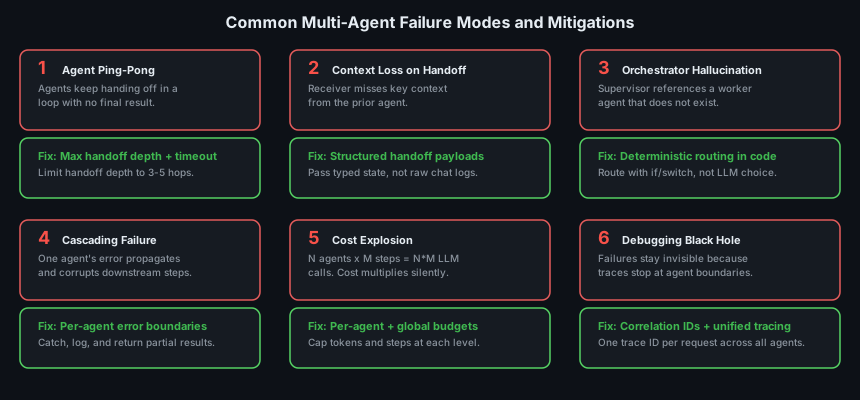
10. Common Mistakes and How to Avoid Them
10.1 Using Multi-Agent When a Single Agent Would Suffice
What happens: A team builds a 4-agent pipeline (researcher + planner + coder + reviewer) for a task that a single well-prompted agent with good tools handles perfectly. The result is 4× the cost, 4× the latency, 3 handoff points that can fail, and a system that’s dramatically harder to debug.
How to avoid it: Always build the single-agent version first. Measure its failures. Only add agents to address specific, documented shortcomings — context overflow, role confusion, or the need for verification. Harrison Chase of LangChain notes: “The most common multi-agent anti-pattern is solving a tool-design problem with more agents.”
10.2 Agent Ping-Pong
What happens: Agent A hands off to Agent B, which determines the task is actually for Agent A, and hands back. This loops indefinitely, consuming tokens and time.
How to avoid it: Set a maximum handoff depth (e.g., 3–5 hops) and enforce it in the orchestration layer, not in the agents’ system prompts. When the limit is hit, escalate to a human or return a partial result.
// Enforce handoff depth limit
private static final int MAX_HANDOFF_DEPTH = 5;

public String handleRequest(String query, int handoffDepth) {
    if (handoffDepth >= MAX_HANDOFF_DEPTH) {
        log.warn("Max handoff depth reached. Escalating to human.");
        return escalateToHuman(query);
    }
    // ... agent logic with handoffDepth + 1 on each handoff
}
10.3 Context Loss on Handoff
What happens: The receiving agent starts from scratch because the handoff only included “continue with the previous task” instead of structured context. The user has to repeat information, and the agent makes decisions without critical context from the previous agent’s reasoning.
How to avoid it: Use structured handoff payloads (see Best Practice 9.3). The receiving agent should get a typed summary of what happened, what was decided, and what it needs to do — not just raw chat history.
10.4 LLM-Driven Routing for Deterministic Paths
What happens: The orchestrator is an LLM that decides which agent to call next. For well-defined workflows (research → write → review), this adds unnecessary latency, cost, and non-determinism. The LLM occasionally routes incorrectly, skips steps, or invents agent names that don’t exist.
How to avoid it: Use deterministic code for routing when the workflow is known. Reserve LLM-based routing for genuinely ambiguous classification (e.g., “Is this a billing question or a shipping question?”). OpenAI’s practical guide explicitly recommends this: “Use deterministic routing when the set of possible paths is known in advance.”
10.5 No Error Boundaries Between Agents
What happens: A researcher agent returns an error or hallucinated result. The writer agent treats the bad input as truth and produces a confidently wrong article. The reviewer agent doesn’t catch it because it lacks access to the original sources. The error cascades through the entire pipeline.
How to avoid it: Implement error boundaries at each handoff point. Validate agent outputs before passing them downstream. If a research agent returns empty results, don’t hand off to the writer — retry or escalate.
// Error boundary between agents
String research = runResearcher(state);
if (research == null || research.isBlank()) {
    log.error("Researcher returned empty results. Retrying...");
    research = runResearcher(state);  // One retry
}
if (research == null || research.isBlank()) {
    return escalateToHuman("Research failed after retries.");
}
// Only proceed to writer if research is valid
return runWriter(state.withResearchFindings(research));
10.6 No Global Budget
What happens: Each agent has its own budget, but there’s no limit on the total cost of the workflow. A retry loop triggers the full pipeline 5 times, consuming 5× the expected budget.
How to avoid it: Set a global budget (total tokens, total time, total handoffs) in addition to per-agent budgets. The orchestrator should check the global budget before starting each agent.
11. Real-World Examples
11.1 OpenAI Agents SDK — Customer Service Triage
The OpenAI Agents SDK provides first-class support for multi-agent handoffs. A typical customer service deployment:
- A Triage Agent classifies the user’s intent (billing, shipping, technical, general).
- Based on classification, it performs a handoff to the appropriate specialist agent.
- The specialist agent has scoped tools and a focused system prompt.
- If the specialist can’t resolve the issue, it hands off to a human escalation agent.
The SDK enforces structured handoffs: each Handoff object specifies the target agent, a description of when to hand off, and optional input filters. This prevents the agent from inventing handoff targets.
11.2 AutoGen — Collaborative Code Generation
Microsoft’s AutoGen framework enables multi-agent conversations for software engineering. A typical setup:
- A User Proxy agent translates the user’s request into a coding task.
- A Coder agent writes the implementation.
- A Critic agent reviews the code for bugs, security issues, and style violations.
- The Coder and Critic iterate until the Critic approves.
The v0.4 rewrite (AgentChat) introduced an event-driven architecture with typed messages, making it production-ready. AutoGen showed that the writer + reviewer loop produces code that passes 20–30% more test cases than a single agent on HumanEval benchmarks.
11.3 STORM (Stanford) — Long-Form Article Writing
STORM (Shao et al., 2024) is a multi-agent system that writes Wikipedia-quality articles:
- A Perspective Agent generates diverse viewpoints and questions about the topic.
- Multiple Expert Agents simulate domain experts answering those questions with grounded, cited responses.
- A Writer Agent synthesizes all perspectives into a structured article with citations.
In human evaluations, STORM articles were rated as more organized, comprehensive, and better cited than articles produced by single-agent systems. This demonstrates that multi-agent specialization produces measurably better output for complex knowledge synthesis tasks.
11.4 Sierra AI — Enterprise Customer Experience
Sierra AI builds production multi-agent systems for enterprise customer service:
- A router agent classifies customer intent with high confidence before handoff.
- Specialist agents (billing, shipping, returns, technical) each have scoped access to only the systems they need.
- Escalation agents detect when confidence drops below a threshold and seamlessly hand off to human agents — preserving full conversation context.
- The system handles millions of conversations per month for brands like WeightWatchers, SiriusXM, and ADT, with CSAT scores on par with human agents.
Sierra’s co-founder Bret Taylor (former Salesforce co-CEO) emphasises that “the routing layer is the most important part of a multi-agent system — get the handoff wrong and everything downstream fails.”
11.5 Google Agent Development Kit (ADK) — A2A Interoperability
Google’s Agent Development Kit (2025) is designed from the ground up for multi-agent collaboration:
- Agents can discover and communicate with each other using the Agent-to-Agent (A2A) protocol — an open standard for inter-agent communication across trust boundaries and frameworks.
- Each agent publishes an Agent Card (JSON metadata) describing its capabilities, inputs, and outputs. Other agents discover and invoke it via the A2A protocol.
- ADK supports native MCP (Model Context Protocol) integration for tool access, meaning agents can share tool servers without duplication.
A2A represents a vision of multi-agent systems that span organizations — not just multiple agents within one application, but agents from different vendors collaborating on a shared task.
12. Example: Building a Multi-Agent System
With Spring AI
import org.springframework.ai.chat.client.ChatClient;
import org.springframework.ai.tool.annotation.Tool;
import org.springframework.ai.tool.annotation.ToolParam;
import org.springframework.beans.factory.annotation.Qualifier;
import org.springframework.context.annotation.Bean;
import org.springframework.context.annotation.Configuration;
import org.springframework.stereotype.Component;
import org.springframework.stereotype.Service;

// Step 1: Define tools for the researcher agent

@Component
public class ResearchTools {

    @Tool(description = """
            Search the web for current information on a topic. \
            Use this when you need up-to-date facts, statistics, or news.""")
    public String searchWeb(
            @ToolParam(description = "The search query") String query) {
        return WebSearchClient.search(query);
    }

    @Tool(description = """
            Look up a topic on Wikipedia for factual background and context. \
            Use for established concepts, historical facts, or definitions.""")
    public String wikipedia(
            @ToolParam(description = "The Wikipedia article title") String title) {
        return WikipediaClient.getSummary(title);
    }
}
// Step 2: Configure specialized agents with distinct roles
@Configuration
public class MultiAgentConfig {
@Bean
ChatClient researcherAgent(ChatClient.Builder builder, ResearchTools tools) {
return builder.clone()
.defaultSystem("""
You are a Senior Research Analyst. Your job is to find accurate, \
up-to-date information on the given topic. Use your search tools \
to gather facts from multiple sources. Always cite your sources. \
Return a structured summary of your findings with key facts, \
statistics, and source URLs.""")
.defaultTools(tools)
.build();
}
@Bean
ChatClient writerAgent(ChatClient.Builder builder) {
return builder.clone()
.defaultSystem("""
You are a Technical Writer for a developer audience. Write clear, \
engaging, and well-structured content based on the research \
findings provided. Use headers, code examples where appropriate, \
and maintain a professional but approachable tone. Do not \
fabricate facts — use only what is provided in the research.""")
.build();
}
@Bean
ChatClient reviewerAgent(ChatClient.Builder builder) {
return builder.clone()
.defaultSystem("""
You are a Technical Reviewer. Review the provided content for: \
1) factual accuracy — flag any unsupported claims, \
2) completeness — identify missing topics, \
3) clarity — flag confusing or ambiguous passages, \
4) structure — suggest organizational improvements. \
Return structured feedback with specific, actionable suggestions.""")
.build();
}
}// Step 3: Orchestrate the workflow with deterministic routing
@Service
public class ResearchReportWorkflow {
private final ChatClient researcherAgent;
private final ChatClient writerAgent;
private final ChatClient reviewerAgent;
public ResearchReportWorkflow(
@Qualifier("researcherAgent") ChatClient researcherAgent,
@Qualifier("writerAgent") ChatClient writerAgent,
@Qualifier("reviewerAgent") ChatClient reviewerAgent) {
this.researcherAgent = researcherAgent;
this.writerAgent = writerAgent;
this.reviewerAgent = reviewerAgent;
}
public String generateReport(String topic) {
String correlationId = UUID.randomUUID().toString();
log.info("[{}] Starting report generation: topic={}", correlationId, topic);
// Phase 1: Research (with tool access)
String research = researcherAgent.prompt()
.user("Research the following topic thoroughly: " + topic)
.toolCallLimit(15)
.call()
.content();
log.info("[{}] Research complete", correlationId);
// Phase 2: Write (no tools — works from research context)
String draft = writerAgent.prompt()
.user("""
Write a comprehensive technical blog post based on these \
research findings:
%s
Target length: 1500 words. Include an introduction, key \
sections with headers, code examples if relevant, and a \
conclusion.""".formatted(research))
.call()
.content();
log.info("[{}] Draft complete", correlationId);
// Phase 3: Review (no tools — evaluates the draft)
String feedback = reviewerAgent.prompt()
.user("Review this blog post draft:\n\n" + draft)
.call()
.content();
log.info("[{}] Review complete", correlationId);
// Phase 4: Revise based on feedback (optional iteration)
if (needsRevision(feedback)) {
draft = writerAgent.prompt()
.user("""
Revise this draft based on the reviewer's feedback:
DRAFT:
%s
FEEDBACK:
%s
Apply all suggested changes and return the revised post."""
.formatted(draft, feedback))
.call()
.content();
log.info("[{}] Revision complete", correlationId);
}
log.info("[{}] Report generation complete", correlationId);
return draft;
}
private boolean needsRevision(String feedback) {
return feedback.toLowerCase().contains("revise")
|| feedback.toLowerCase().contains("incorrect")
|| feedback.toLowerCase().contains("missing");
}
}// Step 4: Wire it up and run
@SpringBootApplication
public class MultiAgentApplication implements CommandLineRunner {
private final ResearchReportWorkflow workflow;
public MultiAgentApplication(ResearchReportWorkflow workflow) {
this.workflow = workflow;
}
public static void main(String[] args) {
SpringApplication.run(MultiAgentApplication.class, args);
}
@Override
public void run(String... args) {
String report = workflow.generateReport(
"The evolution of AI agent frameworks in 2025-2026"
);
System.out.println(report);
}
}Key Design Decisions
- Deterministic orchestration — The workflow is a fixed pipeline (research → write → review → revise), not LLM-driven routing. This makes it testable and predictable.
- Tool isolation — Only the researcher agent has tool access. The writer and reviewer work from context only.
- Structured phases — Each agent gets a clear, bounded task. The researcher doesn’t write. The writer doesn’t search.
- Conditional revision — The reviewer’s feedback determines whether a revision pass is needed, avoiding unnecessary LLM calls.
- Correlation IDs — Every log line includes a correlation ID for end-to-end tracing.