Basic RAG with Spring AI: Build a Grounded Q&A System from Scratch
Large language models are impressive, but they have a fundamental limitation: they can only work with what they learned during training. Ask about your company’s internal docs, last week’s release notes, or anything after the training cutoff — and the model will either hallucinate an answer or admit it doesn’t know.
Retrieval-Augmented Generation (RAG) solves this by giving the LLM access to your own documents at query time. Instead of relying on memorised knowledge, the model receives relevant context retrieved from a knowledge base and generates an answer grounded in that context.
This is the first post in a hands-on series exploring RAG patterns with Spring AI. Each post maps to a demo in the rag-spring-ai project — starting from a minimal retrieval pipeline and progressively layering in production concerns like multi-format ingestion, conversational memory, advisor composition, structured output, and function calling. Every demo runs fully offline with Ollama and Docker Compose — no cloud accounts required.
In this first installment, we build a complete Basic RAG system from scratch: ingest a document, embed it into a vector store, and answer questions grounded in the retrieved context. Every line of code comes from Demo 1: Basic RAG.
1. What Is RAG?
RAG stands for Retrieval-Augmented Generation. The idea is simple: before asking the LLM to answer a question, first retrieve the most relevant pieces of your documents and include them as context in the prompt.
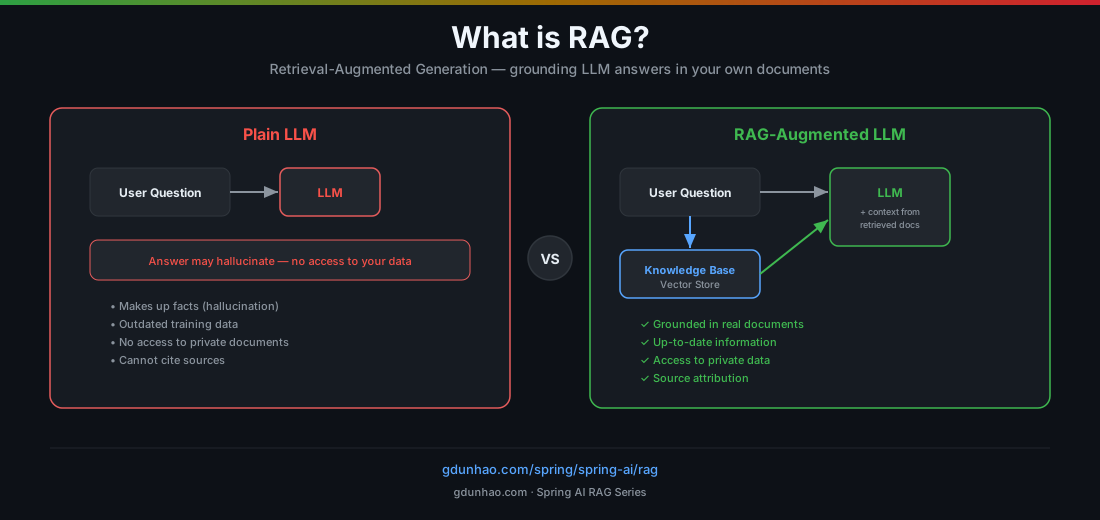
Why RAG Matters
| Problem with plain LLMs | How RAG solves it |
|---|---|
| Hallucination — makes up facts | Grounds answers in real documents |
| Outdated knowledge — training cutoff | Can use up-to-the-minute data |
| No access to private data | Connects to your own document store |
| No source attribution | Can cite where the answer came from |
RAG is the most cost-effective way to give an LLM access to your own data. Unlike fine-tuning (which modifies model weights and requires GPU hours), RAG leaves the model untouched — you’re just changing what goes into the prompt.
2. The Two Phases of RAG
Every RAG system has two distinct phases: ingestion (offline, one-time) and query (online, per request).
Phase 1: Ingestion — Preparing Your Documents
Before the LLM can answer questions about your documents, those documents need to be loaded, split into chunks, converted to vector embeddings, and stored in a vector database.
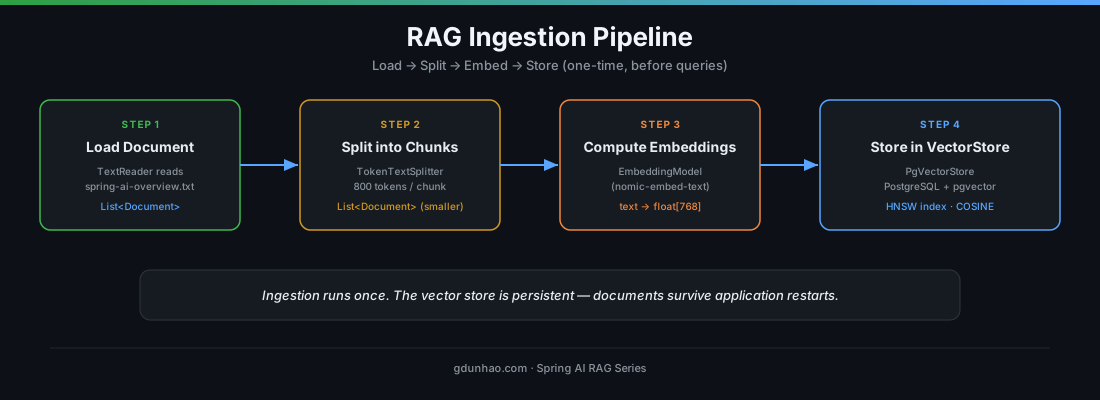
Here’s what each step does:
-
Load — Read the raw document into a
Documentobject. Spring AI providesTextReaderfor.txtfiles,JsonReaderfor JSON, andTikaDocumentReaderfor PDF, DOCX, HTML, and other formats. -
Split — Large documents don’t fit in a single embedding.
TokenTextSplitterbreaks them into smaller chunks (default: 800 tokens per chunk, 350 token overlap). The overlap ensures that context isn’t lost at chunk boundaries. -
Embed — Each chunk is converted to a 768-dimensional floating-point vector using an embedding model (
nomic-embed-textvia Ollama). Texts with similar meaning end up close together in vector space. -
Store — The vectors are written to a
PgVectorStore(PostgreSQL with the pgvector extension), which builds an HNSW index for fast approximate nearest-neighbour search.
Phase 2: Query — Answering Questions
When a user asks a question, the system embeds the question using the same embedding model, searches the vector store for the most similar document chunks, and passes those chunks as context to the LLM alongside the question.
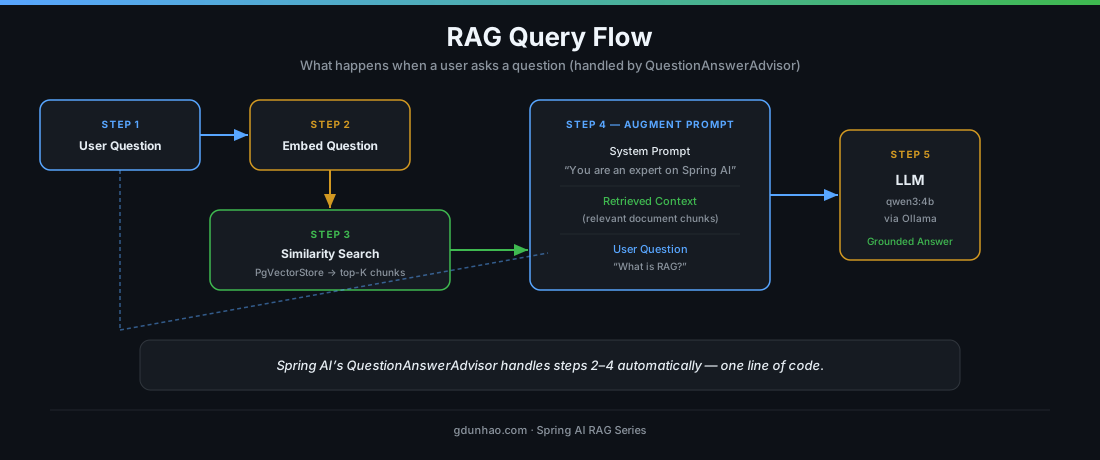
The key insight: the LLM never sees your entire document. It only sees the chunks that are semantically relevant to the question. This keeps the prompt focused and within token limits.
3. Technology Stack
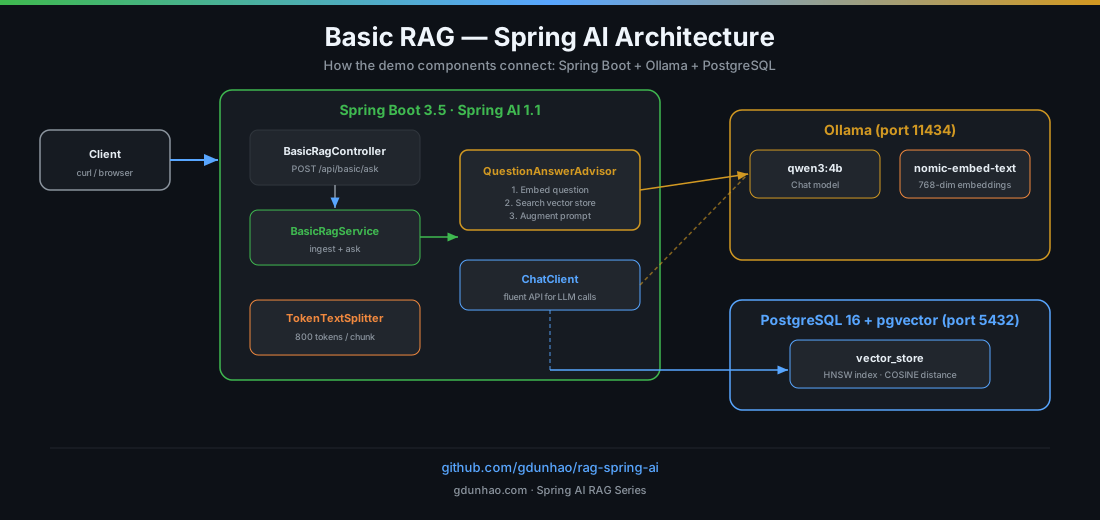
Everything runs locally — no cloud accounts, no API keys:
| Layer | Technology | Role |
|---|---|---|
| Framework | Spring Boot 3.5 + Spring AI 1.1 | Web app + AI abstractions |
| Chat model | Qwen 3 4B via Ollama | Generates answers |
| Embedding model | nomic-embed-text via Ollama | Converts text to 768-dim vectors |
| Vector store | PostgreSQL 16 + pgvector | Persistent similarity search |
| Infrastructure | Docker Compose | Runs PostgreSQL + Ollama |
4. Project Setup
Dependencies (pom.xml)
The project uses Spring AI’s BOM for version management. The key dependencies:
<properties>
    <java.version>25</java.version>
    <spring-ai.version>1.1.4</spring-ai.version>
</properties>

<dependencyManagement>
    <dependencies>
        <dependency>
            <groupId>org.springframework.ai</groupId>
            <artifactId>spring-ai-bom</artifactId>
            <version>${spring-ai.version}</version>
            <type>pom</type>
            <scope>import</scope>
        </dependency>
    </dependencies>
</dependencyManagement>

<dependencies>
    <!-- Spring AI Ollama Starter (Chat + Embeddings) -->
    <dependency>
        <groupId>org.springframework.ai</groupId>
        <artifactId>spring-ai-starter-model-ollama</artifactId>
    </dependency>

    <!-- Spring AI PgVector Store (persistent vector store) -->
    <dependency>
        <groupId>org.springframework.ai</groupId>
        <artifactId>spring-ai-starter-vector-store-pgvector</artifactId>
    </dependency>

    <!-- QuestionAnswerAdvisor (the RAG advisor) -->
    <dependency>
        <groupId>org.springframework.ai</groupId>
        <artifactId>spring-ai-advisors-vector-store</artifactId>
    </dependency>
</dependencies>spring-ai-starter-model-ollamaauto-configures aChatModelandEmbeddingModelbacked by Ollama.spring-ai-starter-vector-store-pgvectorauto-configures aPgVectorStorebacked by PostgreSQL with pgvector.spring-ai-advisors-vector-storeprovidesQuestionAnswerAdvisor— the component that wires retrieval into the chat pipeline.
Configuration (application.yaml)
spring:
  datasource:
    url: jdbc:postgresql://localhost:5432/ragdb
    username: raguser
    password: ragpassword

  ai:
    ollama:
      base-url: http://localhost:11434
      chat:
        options:
          model: qwen3:4b
          temperature: 0.7
          num-predict: 512
      embedding:
        options:
          model: nomic-embed-text

    vectorstore:
      pgvector:
        initialize-schema: true    # auto-creates the vector_store table
        dimensions: 768            # must match nomic-embed-text output
        index-type: HNSW
        distance-type: COSINE_DISTANCE
Key points:
initialize-schema: truetells Spring AI to create thevector_storetable and pgvector extension automatically on first startup.dimensions: 768must match the output dimension of your embedding model (nomic-embed-textproduces 768-dimensional vectors).HNSWis an approximate nearest-neighbour index — much faster than brute-force search at the cost of slightly imprecise results.
Infrastructure (docker-compose.yml)
services:
  postgres:
    image: pgvector/pgvector:pg16
    container_name: rag-postgres
    environment:
      POSTGRES_DB: ragdb
      POSTGRES_USER: raguser
      POSTGRES_PASSWORD: ragpassword
    ports:
      - "5432:5432"

  ollama:
    image: ollama/ollama:latest
    container_name: rag-ollama
    ports:
      - "11434:11434"

  ollama-init:
    image: ollama/ollama:latest
    depends_on:
      ollama:
        condition: service_healthy
    entrypoint: ["/bin/sh", "-c"]
    command:
      - |
        ollama pull qwen3:4b
        ollama pull nomic-embed-text
        echo "All models ready!"
    restart: "no"
Three containers:
- rag-postgres — PostgreSQL 16 with the pgvector extension pre-installed.
- rag-ollama — The Ollama server that hosts the LLM and embedding model.
- rag-ollama-init — A one-shot container that pulls the required models on first run (~3 GB download).
5. The Implementation — Step by Step
The entire Basic RAG demo lives in two files: BasicRagService.java (the logic) and BasicRagController.java (the HTTP layer). Let’s walk through each.
5.1 BasicRagService — Ingestion
The service loads a document, splits it into chunks, and stores the embeddings:
@Service
public class BasicRagService {

    private final ChatClient chatClient;
    private final VectorStore vectorStore;
    private final Resource overviewDocument;
    private final AtomicBoolean ingested = new AtomicBoolean(false);

    public BasicRagService(
            ChatClient.Builder chatClientBuilder,
            VectorStore vectorStore,
            @Value("classpath:documents/sample/spring-ai-overview.txt")
            Resource overviewDocument) {
        this.chatClient = chatClientBuilder
                .defaultSystem("You are an expert on Spring AI. "
                        + "Answer questions using the provided context.")
                .defaultAdvisors(new SimpleLoggerAdvisor())
                .build();
        this.vectorStore = vectorStore;
        this.overviewDocument = overviewDocument;
    }

    public void ingestDocuments() {
        if (!ingested.compareAndSet(false, true)) {
            return; // already ingested — skip
        }

        // 1. Load document
        var reader = new TextReader(overviewDocument);
        reader.getCustomMetadata().put("source", "spring-ai-overview.txt");
        List<Document> documents = reader.get();

        // 2. Split into chunks
        var splitter = new TokenTextSplitter();
        List<Document> chunks = splitter.apply(documents);

        // 3. Store (embedding is computed automatically by VectorStore)
        vectorStore.add(chunks);
    }
}
Let’s break this down:
Constructor injection — Spring AI auto-configures a ChatClient.Builder (backed by Ollama) and a VectorStore (backed by PgVector). We inject both, plus the document resource.
ChatClient.Builder — We customise the client with:
- A system prompt that tells the LLM its role: “You are an expert on Spring AI.”
- A
SimpleLoggerAdvisorthat logs every LLM call at DEBUG level.
AtomicBoolean guard — The compareAndSet(false, true) pattern ensures documents are ingested exactly once, even if multiple requests arrive concurrently. This is important because the vector store is persistent — we don’t want to re-add the same documents on every request.
Step 1: TextReader — Reads the .txt file from the classpath into a Document object. We attach "source" metadata so we can trace which document a chunk came from.
Step 2: TokenTextSplitter — Splits the document into embeddable chunks. Default settings: 800 tokens per chunk with 350-token overlap. The overlap ensures context continuity — if a key concept spans a chunk boundary, it appears in both adjacent chunks.
Step 3: vectorStore.add() — This single call does two things:
- Sends each chunk to the embedding model (
nomic-embed-text) to get a 768-dimensional vector. - Inserts the vector + text + metadata into the PostgreSQL
vector_storetable.
5.2 BasicRagService — Querying
The ask() method is where RAG happens:
public String ask(String question) {
    ingestDocuments(); // ensure documents are loaded

    return chatClient.prompt()
            .advisors(QuestionAnswerAdvisor.builder(vectorStore).build())
            .user(question)
            .call()
            .content();
}
That’s it. Four lines of code for the entire RAG query pipeline. Here’s what QuestionAnswerAdvisor does behind the scenes:
- Embeds the question — converts
"What is RAG?"into a 768-dimensional vector using the same embedding model. - Searches the vector store — performs a cosine similarity search against all stored document chunks, returning the top-K most relevant results (default K=4).
- Augments the prompt — injects the retrieved chunks into the LLM prompt as context, between the system prompt and the user’s question.
- Calls the LLM — sends the complete prompt (system + context + question) to
qwen3:4bvia Ollama. - Returns the answer — the LLM generates a response grounded in the retrieved context.
The ChatClient fluent API reads like natural language:
chatClient
    .prompt()                           // start building a prompt
    .advisors(QuestionAnswerAdvisor...) // add RAG retrieval
    .user(question)                     // set the user's question
    .call()                             // send to LLM
    .content();                         // extract the text response
5.3 BasicRagController — The HTTP Layer
The controller is a thin REST layer that delegates everything to the service:
@Validated
@RestController
@RequestMapping("/api/basic")
public class BasicRagController {

    private final BasicRagService ragService;

    public BasicRagController(BasicRagService ragService) {
        this.ragService = ragService;
    }

    @PostMapping("/ask")
    public Map<String, String> ask(
            @Valid @RequestBody QuestionRequest request) {
        String answer = ragService.ask(request.question());
        return Map.of(
                "question", request.question(),
                "answer", answer
        );
    }

    @PostMapping("/ingest")
    public Map<String, String> ingest() {
        ragService.ingestDocuments();
        return Map.of("status", "Documents ingested successfully");
    }
}
The request DTO uses a Java record with Bean Validation:
public record QuestionRequest(@NotBlank String question) {}Two endpoints:
POST /api/basic/ingest— triggers document ingestion manually.POST /api/basic/ask— accepts a JSON body with aquestionfield, runs the RAG pipeline, and returns the grounded answer.
6. Running the Demo
Start the infrastructure
# Clone the project
git clone https://github.com/gdunhao/rag-spring-ai.git
cd rag-spring-ai

# Start PostgreSQL + Ollama (first run downloads ~3 GB of models)
docker compose up -d

# Wait for models to be pulled
docker compose logs -f ollama-init
# Wait until you see: "All models ready!"
Start the application
./mvnw spring-boot:runIngest documents and ask a question
# 1. Ingest the sample document
curl -s -X POST http://localhost:8080/api/basic/ingest | jq

# 2. Ask a RAG-powered question
curl -s -X POST http://localhost:8080/api/basic/ask \
  -H "Content-Type: application/json" \
  -d '{"question": "What is RAG and how does it work?"}' | jq
Example response:
{
  "question": "What is RAG and how does it work?",
  "answer": "RAG (Retrieval-Augmented Generation) works by: 1. Ingesting documents and splitting them into chunks, 2. Converting each chunk into a vector embedding, 3. Storing embeddings in a vector store, 4. When a query arrives, finding similar document chunks, 5. Including the retrieved chunks as context in the LLM prompt..."
}
More questions to try
# What LLM providers does Spring AI support?
curl -s -X POST http://localhost:8080/api/basic/ask \
  -H "Content-Type: application/json" \
  -d '{"question": "What LLM providers does Spring AI support?"}' | jq

# What vector databases work with Spring AI?
curl -s -X POST http://localhost:8080/api/basic/ask \
  -H "Content-Type: application/json" \
  -d '{"question": "What vector databases can I use with Spring AI?"}' | jq

# How does RAG reduce hallucination?
curl -s -X POST http://localhost:8080/api/basic/ask \
  -H "Content-Type: application/json" \
  -d '{"question": "How does RAG reduce hallucination?"}' | jq
7. The Interactive Playground
The rag-spring-ai project ships with a web-based playground that lets you interact with every demo — including Demo 1: Basic RAG — directly from your browser. No curl commands, no Postman, no separate client. Just open localhost:8080 after starting the application.
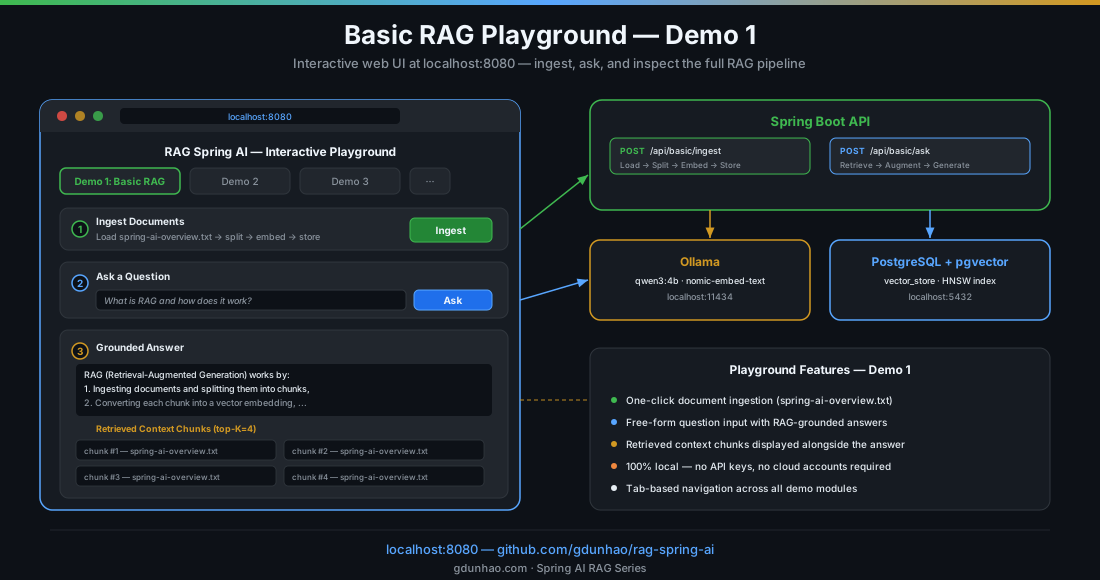
What the Playground Offers
| Feature | Description |
|---|---|
| One-click ingestion | Press the Ingest button to load spring-ai-overview.txt, split it into chunks, embed, and store — no terminal required. |
| Free-form question input | Type any question about Spring AI and hit Ask. The playground calls POST /api/basic/ask behind the scenes. |
| Grounded answer display | The LLM response appears immediately, grounded in the retrieved context. |
| Retrieved context inspection | Below the answer, the playground shows the top-K context chunks that were injected into the prompt — so you can verify exactly what the LLM saw. |
| Tab-based demo navigation | Switch between Demo 1 (Basic RAG), Demo 2 (Document Ingestion), Demo 3 (Vector Store Operations), and the rest — each demo has its own dedicated tab. |
| Fully local | No API keys, no cloud accounts. The playground connects to Ollama and PostgreSQL running on your machine via Docker Compose. |
Playground Endpoints (Demo 1)
The playground is a thin UI layer over the same REST API covered in section 5.3:
| Action | HTTP Method | Endpoint | Request Body |
|---|---|---|---|
| Ingest documents | POST |
/api/basic/ingest |
— |
| Ask a question | POST |
/api/basic/ask |
{"question": "..."} |
Behind the scenes, these are the exact same endpoints that the curl commands in section 6 call. The playground just provides a visual interface on top of them.
How to Launch
# 1. Start infrastructure (if not already running)
docker compose up -d

# 2. Start the Spring Boot application
./mvnw spring-boot:run

# 3. Open the playground
open http://localhost:8080
The playground is served by the same Spring Boot application — no separate frontend build or npm install. It loads instantly and works in any modern browser.
8. Understanding the Key Spring AI Abstractions
Let’s zoom into the Spring AI components that make this work.
ChatClient
ChatClient is the main entry point for interacting with LLMs in Spring AI. It provides a fluent, builder-style API:
ChatClient chatClient = ChatClient.builder(chatModel)
        .defaultSystem("You are an expert on Spring AI.")
        .defaultAdvisors(new SimpleLoggerAdvisor())
        .build();

String response = chatClient.prompt()
        .user("What is Spring AI?")
        .call()
        .content();
Think of ChatClient as the equivalent of RestTemplate or WebClient, but for LLM calls. It handles prompt construction, model invocation, and response extraction.
VectorStore
VectorStore is Spring AI’s abstraction over vector databases. The PgVectorStore implementation uses PostgreSQL with the pgvector extension:
// Store documents (embedding is computed automatically)
vectorStore.add(chunks);

// Search for similar documents
List<Document> results = vectorStore.similaritySearch(
        SearchRequest.builder()
                .query("What is RAG?")
                .topK(4)
                .build()
);
When you call vectorStore.add(chunks), Spring AI:
- Sends each chunk’s text to the
EmbeddingModel(nomic-embed-text). - Receives back a
float[768]vector. - Inserts the text, metadata, and vector into the
vector_storetable.
QuestionAnswerAdvisor
This is the component that ties retrieval and generation together. Advisors in Spring AI are middleware-like interceptors that modify the prompt before it reaches the LLM:
chatClient.prompt()
    .advisors(QuestionAnswerAdvisor.builder(vectorStore).build())
    .user(question)
    .call()
    .content();
QuestionAnswerAdvisor intercepts the chat request, performs a similarity search on the vector store, and injects the retrieved documents into the prompt. The LLM then sees:
[System Prompt]
You are an expert on Spring AI. Answer questions using the provided context.

[Context - retrieved from vector store]
Spring AI is a framework that brings the power of AI to Spring applications...
The RAG pattern works by: 1. Ingesting documents and splitting them into chunks...

[User Question]
What is RAG and how does it work?
TokenTextSplitter
Documents need to be split into chunks that fit within the embedding model’s context window. TokenTextSplitter handles this:
var splitter = new TokenTextSplitter();  // defaults: 800 tokens, 350 overlap
List<Document> chunks = splitter.apply(documents);
Why chunking matters:
- Embedding models have a maximum input length. If your document exceeds it, the embedding quality degrades.
- Smaller, focused chunks produce better similarity matches than one giant embedding of the entire document.
- The overlap (350 tokens) ensures that concepts spanning a chunk boundary appear in both chunks — so they can still be found by similarity search.
9. What Happens Under the Hood — End to End
Let’s trace a complete request through the system to solidify the mental model.
1. Client sends a question:
POST /api/basic/ask
{"question": "What vector databases can I use with Spring AI?"}
2. Controller receives the request, validates the @NotBlank constraint, and calls ragService.ask(question).
3. Service calls ingestDocuments(). The AtomicBoolean guard returns immediately because documents were already ingested.
4. Service builds the ChatClient prompt with QuestionAnswerAdvisor.
5. QuestionAnswerAdvisor intercepts the request:
- Sends the question to
nomic-embed-text→ gets afloat[768]vector. - Queries
PgVectorStorefor the 4 most similar chunks (cosine distance). - PostgreSQL uses the HNSW index for fast approximate search.
- Returns chunks like: “Supported Vector Stores: SimpleVectorStore, PgVector, Chroma, Milvus, Pinecone…”
6. Augmented prompt is built:
- System: “You are an expert on Spring AI.”
- Context: (the retrieved chunks)
- User: “What vector databases can I use with Spring AI?”
7. LLM (qwen3:4b via Ollama) generates a response grounded in the context.
8. Response flows back through the advisor → service → controller → client as JSON.
10. Key Takeaways
-
RAG is the simplest way to give an LLM access to your data. No model training, no GPU infrastructure — just retrieve relevant documents and add them to the prompt.
-
Spring AI makes RAG trivially easy. The
QuestionAnswerAdvisorhandles embedding, retrieval, and prompt augmentation in a single line of code. -
The ingestion pipeline is straightforward: Load → Split → Embed → Store. Spring AI provides
TextReader,TokenTextSplitter, andVectorStoreabstractions for each step. -
Everything runs locally. Ollama serves the models, PostgreSQL with pgvector stores the vectors, and Docker Compose orchestrates it all. Zero cloud dependencies.
-
The vector store is persistent. Once documents are ingested, they survive application restarts. You don’t need to re-ingest on every startup.
-
Test without infrastructure. Stub the
ChatModel, mock theVectorStore, and run pure unit tests — no Docker required.
Series Roadmap
This post covers the foundation — a minimal, end-to-end RAG pipeline. Upcoming posts in this series will layer in progressively more advanced patterns, each mapping to a demo in the rag-spring-ai project:
| Post | Topic | What it adds |
|---|---|---|
| → You are here | Basic RAG | End-to-end retrieval pipeline with QuestionAnswerAdvisor |
| Coming next | Document Ingestion | Multi-format loading (JSON, PDF, DOCX), custom chunk sizes, metadata enrichment |
| Vector Store Operations | Direct similarity search, threshold tuning, embedding inspection | |
| Chat with Memory | Conversational RAG with per-session history and context carryover | |
| Advisors | Composing RAG + memory + safety advisors in a pipeline | |
| Structured Output | Extracting typed Java records from LLM responses | |
| Function Calling | Letting the LLM invoke Java methods as tools | |
| Multi-Document RAG | Multiple document collections with smart routing | |
| Metadata Filtering | Scoping vector search with metadata filters |
Each post follows the same pattern as this one: a focused walkthrough of a single demo, with diagrams, full code listings, and a runnable example you can try locally. Links will go live as posts are published — follow the RAG with Spring AI series page to see them all in one place.
Source code: github.com/gdunhao/rag-spring-ai — clone it, run
make setup && make run, and open localhost:8080 for the interactive playground.