Vector Store Operations with Spring AI: Similarity Search, Thresholds, and Embedding Inspection
In the first post we built a basic RAG pipeline, and in the second post we explored different ways to ingest documents. Both times, we let QuestionAnswerAdvisor handle the retrieval for us — it searched the vector store, grabbed the top chunks, and stuffed them into the prompt. Magic, right?
But here’s the thing: when something goes wrong with your RAG answers — and it will — you need to understand what’s happening underneath that advisor. Why did the LLM get a weird chunk? Why did it miss an obvious answer? Was it a bad embedding? A too-loose search? The wrong threshold?
This post is about getting your hands dirty with the vector store directly. We’ll skip the advisor entirely and work with VectorStore and EmbeddingModel face-to-face. You’ll learn how to run similarity searches with full control, tune similarity thresholds to filter out noise, and inspect raw embeddings to understand what the model actually “sees.” Everything maps to Demo 3: Vector Store Operations in the rag-spring-ai project.
1. Why Bother with Direct Vector Store Operations?
QuestionAnswerAdvisor is great for getting a RAG system running fast. But it’s a black box. You call it, it retrieves chunks, it augments the prompt — and you never see what happened in between.
When you’re debugging retrieval quality (and trust me, you will be), you need to answer questions like:
- What chunks did the similarity search actually return? Maybe the top result is irrelevant and the 5th result is the one you wanted.
- What are the similarity scores? A score of 0.95 and a score of 0.3 both count as “results” by default — but one is a great match and the other is noise.
- Should I set a threshold? If you only want highly relevant chunks, you need to filter out the low-scoring ones. But set it too high and you get nothing back.
- What does the embedding even look like? Sometimes two texts that seem similar to you end up far apart in vector space (and vice versa).
Direct vector store operations give you visibility into all of this.
2. What’s in Vector Store Operations Demo
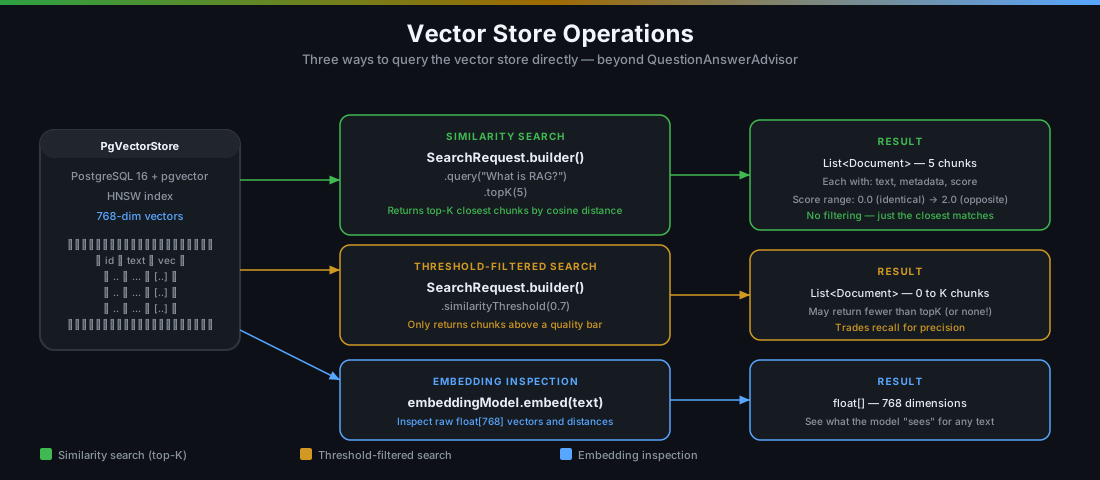
The Vector Store Operations Demo exposes three operations, each hitting the VectorStore or EmbeddingModel directly — no ChatClient, no advisor:
| Operation | What it does |
|---|---|
| Similarity search | Finds the top-K closest document chunks for a query |
| Threshold search | Same as above, but drops results below a similarity score |
| Embedding inspection | Converts any text into its raw float[] vector so you can see what the model sees |
The code lives in VectorStoreService.java and VectorStoreController.java.
3. The VectorStoreService — Three Operations
3.1 Similarity Search
This is the most fundamental vector store operation. You give it a query, it gives you back the closest document chunks:
public List<Map<String, Object>> similaritySearch(String query, int topK) {
    List<Document> results = vectorStore.similaritySearch(
            SearchRequest.builder()
                    .query(query)
                    .topK(topK)
                    .build()
    );

    return results.stream()
            .map(doc -> Map.<String, Object>of(
                    "content", doc.getText(),
                    "metadata", doc.getMetadata(),
                    "score", doc.getScore()
            ))
            .toList();
}
Let’s unpack what happens when you call vectorStore.similaritySearch():
- Your query gets embedded — the text
"What is RAG?"gets sent tonomic-embed-text, which returns afloat[768]vector. - PostgreSQL searches the HNSW index — it compares your query vector against every stored chunk vector using cosine distance and returns the
topKclosest ones. - Results come back as
Documentobjects — each with the chunk text, its metadata (source, type, etc.), and a similarity score.
The score deserves some attention. Spring AI normalizes it to a 0–1 range where 1.0 means identical and 0.0 means completely unrelated. In practice, you’ll rarely see scores above 0.95 or below 0.1 — most results cluster somewhere in the 0.3–0.9 range.
Here’s the key insight: topK always returns exactly K results (assuming you have at least K chunks stored). It doesn’t care whether those results are actually relevant. If you ask "What is the capital of France?" and your vector store only has Spring AI documentation, you’ll still get 5 results — they’ll just all have low scores.
3.2 Threshold Search
This is where things get more interesting. Instead of blindly returning the top K results, you set a similarity threshold — a minimum score that results must meet to be included:
public List<Map<String, Object>> similaritySearchWithThreshold(
        String query, int topK, double threshold) {
    List<Document> results = vectorStore.similaritySearch(
            SearchRequest.builder()
                    .query(query)
                    .topK(topK)
                    .similarityThreshold(threshold)
                    .build()
    );

    return results.stream()
            .map(doc -> Map.<String, Object>of(
                    "content", doc.getText(),
                    "metadata", doc.getMetadata(),
                    "score", doc.getScore()
            ))
            .toList();
}
The only difference from plain similarity search is .similarityThreshold(threshold). But that one line changes the behavior significantly:
- Without threshold: “Give me the 5 closest chunks, no matter how bad they are.”
- With threshold: “Give me up to 5 chunks, but only if they’re actually relevant.”
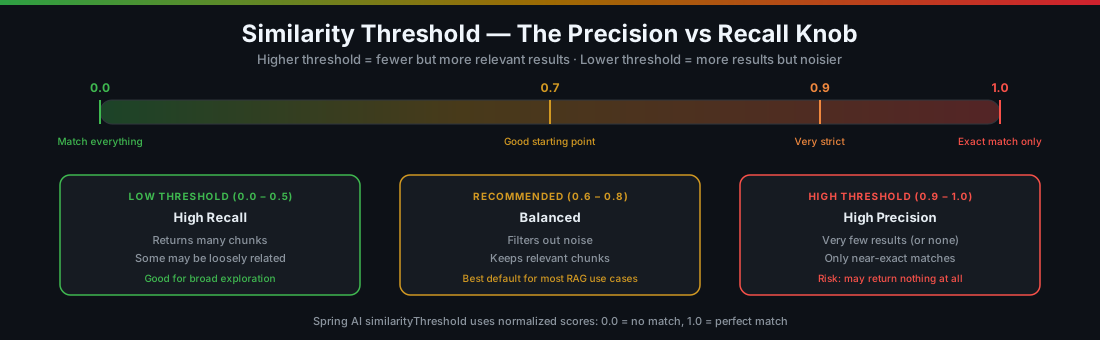
A few things to keep in mind:
- Threshold search can return fewer than
topKresults. If only 2 out of 5 chunks meet the threshold, you get 2. If none do, you get an empty list. - It can return zero results. This is actually useful — it tells you the vector store doesn’t have anything relevant to the query. Better to return nothing than to feed irrelevant chunks to the LLM.
- The “right” threshold depends on your data. I usually start at 0.7 and adjust based on what I see. Domain-specific technical content often needs a lower threshold (0.5–0.6) because the embedding model doesn’t capture jargon as well.
3.3 Embedding Inspection
Sometimes you want to see what the embedding model actually produces — the raw vector for a piece of text. This is mostly a debugging and learning tool, but it’s surprisingly useful:
public Map<String, Object> inspectEmbedding(String text) {
    float[] embedding = embeddingModel.embed(text);

    return Map.of(
            "text", text,
            "dimensions", embedding.length,
            "embedding", truncateForDisplay(embedding),
            "sample", firstN(embedding, 10)
    );
}
This calls embeddingModel.embed(text) directly — bypassing the vector store entirely. You get back the raw float[768] array that represents the text in vector space.
Why would you do this? A few reasons:
- Verify the embedding model is working. If every text returns the same vector, something’s wrong with Ollama.
- Compare embeddings manually. Embed two texts and compute the cosine distance yourself. It helps build intuition for what “close” and “far” mean in vector space.
- Debug weird retrieval results. If a chunk that should be relevant isn’t being retrieved, embed both the query and the chunk and see how far apart they actually are.
The response includes the first 10 dimensions as a sample (the full 768 values would be a lot to stare at) plus the total dimension count for sanity checking.
4. The VectorStoreController — The HTTP Layer
The controller follows the same thin pattern as the previous demos:
@Validated
@RestController
@RequestMapping("/api/vectorstore")
public class VectorStoreController {

    private final VectorStoreService vectorStoreService;

    public VectorStoreController(VectorStoreService vectorStoreService) {
        this.vectorStoreService = vectorStoreService;
    }

    @PostMapping("/search")
    public List<Map<String, Object>> search(
            @RequestParam String query,
            @RequestParam(defaultValue = "5") int topK) {
        return vectorStoreService.similaritySearch(query, topK);
    }

    @PostMapping("/search/threshold")
    public List<Map<String, Object>> searchWithThreshold(
            @RequestParam String query,
            @RequestParam(defaultValue = "5") int topK,
            @RequestParam(defaultValue = "0.7") double threshold) {
        return vectorStoreService.similaritySearchWithThreshold(
                query, topK, threshold);
    }

    @PostMapping("/embedding")
    public Map<String, Object> inspectEmbedding(
            @RequestParam String text) {
        return vectorStoreService.inspectEmbedding(text);
    }
}
Three endpoints:
| Action | HTTP Method | Endpoint | Parameters |
|---|---|---|---|
| Similarity search | POST |
/api/vectorstore/search |
query, topK (default 5) |
| Threshold search | POST |
/api/vectorstore/search/threshold |
query, topK (default 5), threshold (default 0.7) |
| Embedding inspection | POST |
/api/vectorstore/embedding |
text |
5. Running the Demo
Make sure you’ve ingested some documents first (from Demo 1 or Demo 2). The vector store needs data to search against.
# If you haven't already — start infrastructure and app
docker compose up -d
./mvnw spring-boot:run

# Ingest documents (if not done already)
curl -s -X POST http://localhost:8080/api/basic/ingest | jq
Plain similarity search
# Search for "What is RAG?" — top 5 results
curl -s -X POST "http://localhost:8080/api/vectorstore/search?query=What+is+RAG&topK=5" | jq
Example response:
[
  {
    "content": "RAG stands for Retrieval-Augmented Generation...",
    "metadata": {"source": "spring-ai-overview.txt", "type": "text"},
    "score": 0.8721
  },
  {
    "content": "The RAG pattern works by combining retrieval...",
    "metadata": {"source": "spring-ai-overview.txt", "type": "text"},
    "score": 0.8103
  },
  {
    "content": "Spring AI supports multiple vector stores...",
    "metadata": {"source": "spring-ai-overview.txt", "type": "text"},
    "score": 0.4892
  }
]
Notice the scores. The first two results are clearly relevant (0.87, 0.81) — they’re directly about RAG. The third one (0.49) is about vector stores, which is tangentially related but not really answering the question. Without a threshold, all three come back.
Threshold search
# Same query, but only keep results with score >= 0.7
curl -s -X POST "http://localhost:8080/api/vectorstore/search/threshold?query=What+is+RAG&topK=5&threshold=0.7" | jq
Now you’ll only get the first two results — the third one (0.49) gets filtered out. This is exactly the kind of noise reduction that makes your RAG answers better. The LLM sees fewer but more relevant chunks, and the answer quality goes up.
Try different thresholds
# Very strict — might return nothing
curl -s -X POST "http://localhost:8080/api/vectorstore/search/threshold?query=What+is+RAG&topK=5&threshold=0.95" | jq

# Very loose — almost everything passes
curl -s -X POST "http://localhost:8080/api/vectorstore/search/threshold?query=What+is+RAG&topK=5&threshold=0.2" | jq

# Off-topic query — see what happens with threshold
curl -s -X POST "http://localhost:8080/api/vectorstore/search/threshold?query=How+to+bake+a+cake&topK=5&threshold=0.7" | jq
That last one is fun — ask about baking a cake when your vector store only has Spring AI docs. Without a threshold, you’ll still get 5 results (whatever’s “closest,” even if it’s not close at all). With a 0.7 threshold, you’ll get an empty list — which is the correct answer.
Inspect embeddings
# See the raw embedding for a text
curl -s -X POST "http://localhost:8080/api/vectorstore/embedding?text=What+is+RAG" | jq

# Compare two related texts
curl -s -X POST "http://localhost:8080/api/vectorstore/embedding?text=Retrieval+Augmented+Generation" | jq
Example response:
{
  "text": "What is RAG",
  "dimensions": 768,
  "embedding": "[0.0234, -0.0891, 0.1203, ...]",
  "sample": [0.0234, -0.0891, 0.1203, 0.0567, -0.0342, 0.0891, -0.1102, 0.0445, 0.0678, -0.0234]
}
The 768 numbers are what the embedding model “sees” for that text. Two texts with similar meaning will have vectors pointing in similar directions (high cosine similarity). Embed “What is RAG” and “Retrieval Augmented Generation” — they’ll be very close. Embed “What is RAG” and “chocolate cake recipe” — they’ll be far apart.
6. Practical Tips for Tuning Similarity Search
After playing with this demo for a while, here are the patterns I’ve landed on:
Start with topK=5 and no threshold
Get a feel for what the vector store returns for your typical queries. Look at the scores. If the top results are consistently above 0.7 and the bottom ones are below 0.4, you’ve got a natural threshold boundary.
Set a threshold around 0.7 for production
This is a reasonable starting point for most RAG use cases. It filters out the clearly irrelevant stuff without being so strict that you miss useful chunks. Adjust based on your specific data — technical jargon-heavy content might need 0.5–0.6.
Use embedding inspection for debugging
When a query returns unexpected results, embed the query and the expected chunks separately. Check their cosine similarity manually. If they’re far apart, the issue is in the embedding (maybe the text needs to be phrased differently, or the chunk is too large). If they’re close but not being returned, the issue might be in the HNSW index approximation (rare, but it happens).
Don’t over-tune topK
Going from topK=4 to topK=10 rarely helps. More chunks means more context in the prompt, which costs more tokens and can actually confuse the LLM if the extra chunks aren’t relevant. I stick with 3–5 for most use cases.
Combine threshold search with QuestionAnswerAdvisor
Once you’ve found a good threshold through experimentation with this demo, you can set it on the advisor too:
QuestionAnswerAdvisor.builder(vectorStore)
        .searchRequest(SearchRequest.builder()
                .topK(5)
                .similarityThreshold(0.7)
                .build())
        .build();
Now your RAG pipeline uses the same threshold you tuned — and the LLM only sees chunks that actually matter.
7. What’s Actually in the Vector Store Table?
If you’re curious about what PostgreSQL is storing under the hood, you can query the vector_store table directly:
-- See all stored chunks with their metadata
SELECT id, content, metadata
FROM vector_store
LIMIT 10;

-- Check the embedding vector (it's big — 768 floats)
SELECT id, substring(content, 1, 80) as preview, embedding
FROM vector_store
LIMIT 3;

-- Manual cosine similarity search (this is what Spring AI does)
SELECT id, substring(content, 1, 80) as preview,
       1 - (embedding <=> '[0.0234, -0.0891, ...]') as similarity
FROM vector_store
ORDER BY embedding <=> '[0.0234, -0.0891, ...]'
LIMIT 5;
The <=> operator is pgvector’s cosine distance operator. Spring AI’s similaritySearch() generates exactly this kind of query behind the scenes. The HNSW index makes it fast — instead of brute-force comparing against every row, it navigates a graph structure to find approximate nearest neighbours in logarithmic time.
8. Key Takeaways
-
QuestionAnswerAdvisoris great, but it’s a black box. When you need to debug retrieval quality, go straight toVectorStore.similaritySearch()and look at the scores. -
Similarity threshold is your best friend. Without it, you’ll always get K results — even when none of them are relevant. A threshold of 0.7 is a solid starting point.
-
Empty results are better than wrong results. If the threshold search returns nothing, that’s useful information. It means your vector store doesn’t have the answer — and you’d rather know that than feed garbage to the LLM.
-
Embedding inspection builds intuition. Seeing the raw vectors helps you understand why certain searches work and others don’t. It’s a debugging tool you’ll reach for more often than you’d expect.
-
Tune search parameters with direct operations, then apply them to the advisor. Demo 3 is a sandbox for finding the right
topKand threshold. Once you’re happy, plug those values intoQuestionAnswerAdvisorfor your production pipeline.
Series Roadmap
| Post | Topic | What it adds |
|---|---|---|
| Post 1 | Basic RAG | End-to-end retrieval pipeline with QuestionAnswerAdvisor |
| Post 2 | Document Ingestion | Multi-format loading, custom chunk sizes, metadata enrichment |
| → You are here | Vector Store Operations | Direct similarity search, threshold tuning, embedding inspection |
| Coming next | Chat with Memory | Conversational RAG with per-session history and context carryover |
| Advisors | Composing RAG + memory + safety advisors in a pipeline | |
| Structured Output | Extracting typed Java records from LLM responses | |
| Function Calling | Letting the LLM invoke Java methods as tools | |
| Multi-Document RAG | Multiple document collections with smart routing | |
| Metadata Filtering | Scoping vector search with metadata filters |
Source code: github.com/gdunhao/rag-spring-ai — clone it, run
make setup && make run, and open localhost:8080 for the interactive playground.