Chat with Memory in Spring AI: Conversational RAG That Actually Remembers
So far in this series we’ve built a basic RAG pipeline, loaded a few different document formats, and poked at the vector store directly to understand what retrieval actually returns.
All three of those demos share one annoying limitation: each request is a blank slate. You ask “What is Spring AI?”, you get a nice grounded answer. You then ask “what vector stores does it support?” — and the model has no idea what “it” refers to. Every call starts from zero.
That’s fine for a search-bar-style Q&A system. It falls apart the moment you want an assistant, a chatbot, or anything that feels like a real conversation. This post is about fixing that with the smallest amount of code possible, using Spring AI’s chat memory building blocks. Everything here maps to Demo 4: Chat with Memory in the rag-spring-ai project.
1. Why LLMs Forget (And Why Memory Isn’t “Built In”)
LLMs are stateless. The model you call — whether it’s GPT-4, Claude, or a local qwen3:4b via Ollama — doesn’t remember anything between requests. Every call is a fresh HTTP request with a prompt going in and a completion coming out. There is no server-side session.
If you want the model to “remember” turn 1 when you send turn 2, you have to resend turn 1 as part of the prompt. That’s it. That’s the whole trick. Chat memory is just a disciplined way of:
- Saving each
(user message, assistant reply)pair somewhere. - Pulling the last N of them back out before the next call.
- Prepending them to the prompt as message history.
You could code this by hand in about 50 lines. You don’t have to, because Spring AI gives you advisors for it — and they plug into the same pipeline as QuestionAnswerAdvisor. Which means memory and RAG compose cleanly.
2. What’s in the Chat with Memory Demo
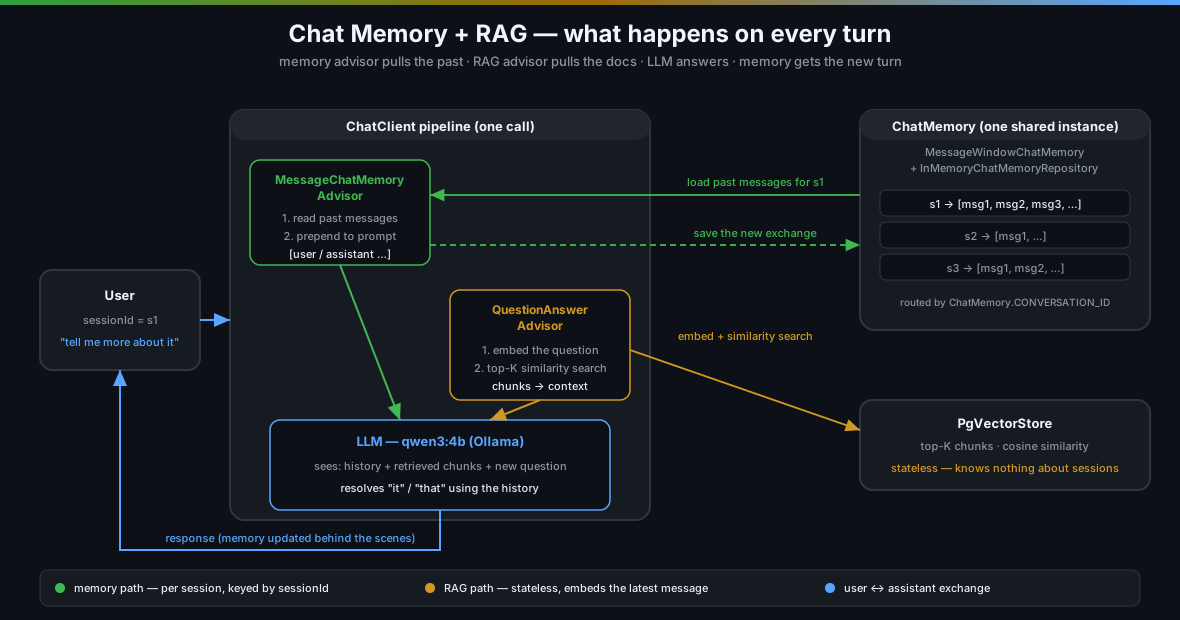
ChatClient. Memory is keyed by session ID; the vector store is stateless.The demo exposes four endpoints — enough to play with multi-turn conversations, compare memory-only vs memory+RAG, and manage sessions:
| Action | HTTP Method | Endpoint |
|---|---|---|
| Chat with RAG + memory | POST |
/api/chat/{sessionId} |
| Chat with memory only (no RAG) | POST |
/api/chat/{sessionId}/simple |
| Clear a session’s history | DELETE |
/api/chat/{sessionId} |
| List active sessions | GET |
/api/chat/sessions |
All the interesting logic lives in two files: ChatMemoryService.java and ChatMemoryController.java.
3. The Three Building Blocks
Spring AI 1.0 splits chat memory into three pieces that fit together like Lego:
ChatMemoryRepository— the storage. Where do conversations actually live? In-memory map? Redis? Cassandra? A database?ChatMemory— the policy layer. How much history do we keep? A rolling window of the last 20 messages? A token-budget-aware trimmer?MessageChatMemoryAdvisor— the glue. An advisor that hooks into theChatClientpipeline, loads the right slice of history before the LLM call, and writes the new exchange back afterwards.
For the demo we use the simplest combination: InMemoryChatMemoryRepository (a ConcurrentHashMap under the hood) wrapped in a MessageWindowChatMemory (defaults to 20 messages per conversation). In production you’d swap the repository for Redis or CassandraChatMemory; the rest stays the same.
4. The ChatMemoryService — Wiring It Up
Here’s the constructor. Nothing clever, but every line matters:
public ChatMemoryService(ChatClient.Builder chatClientBuilder, VectorStore vectorStore) {
    this.vectorStore = vectorStore;

    InMemoryChatMemoryRepository memoryRepository = new InMemoryChatMemoryRepository();
    this.chatMemory = MessageWindowChatMemory.builder()
            .chatMemoryRepository(memoryRepository)
            .build();

    this.chatClient = chatClientBuilder
            .defaultSystem("""
                    You are a helpful conversational assistant with access to a knowledge base.
                    Use the retrieved context to answer questions. Remember the conversation
                    history and use it to understand follow-up questions.
                    """)
            .defaultAdvisors(
                    MessageChatMemoryAdvisor.builder(chatMemory).build(),
                    new SimpleLoggerAdvisor()
            )
            .build();
}
A few things worth calling out:
- One
ChatMemoryinstance, many conversations. You don’t create a new memory per user. You create one instance that stores all conversations, keyed by session ID. The right conversation is picked at call time. MessageChatMemoryAdvisoris a default advisor. We attach it once on the builder. That means every call through thisChatClientautomatically gets memory — we never have to think about it again.- The
ChatClientis built once. Not per request, not per session. In the earlier versions of the Spring AI docs you’d see people building a fresh client per session — that’s the old pattern and it’s not needed. Build one, reuse forever.
Now the chat method:
public String chat(String sessionId, String message) {
    return chatClient.prompt()
            .advisors(QuestionAnswerAdvisor.builder(vectorStore).build())
            .advisors(a -> a.param(ChatMemory.CONVERSATION_ID, sessionId))
            .user(message)
            .call()
            .content();
}
Two .advisors(...) calls, doing very different things:
- The first one adds a
QuestionAnswerAdvisorfor this specific call — that’s the RAG piece. It embeds the user’s message, pulls top-K chunks from the vector store, and stuffs them into the prompt as context. - The second one configures the existing memory advisor via an advisor parameter — it tells it which conversation to load.
ChatMemory.CONVERSATION_IDis literally just a string key ("chat_memory_conversation_id"), andsessionIdis whatever the caller passed in (a UUID, a username, an employee ID — up to you).
That’s the whole integration. Two advisors, one line of config, and you have conversational RAG.
5. Memory-Only Mode — Proving Memory Actually Works
The service also exposes a second method that skips RAG entirely:
public String chatWithoutRag(String sessionId, String message) {
    return chatClient.prompt()
            .system("You are a friendly assistant. Remember our conversation history.")
            .advisors(a -> a.param(ChatMemory.CONVERSATION_ID, sessionId))
            .user(message)
            .call()
            .content();
}
Notice what’s missing: no QuestionAnswerAdvisor. The memory advisor is still there (it’s a default), so history still flows through — but there’s no vector search.
This is genuinely useful, and not just as a debugging tool. When you’re trying to understand whether a weird answer came from the memory subsystem or from RAG retrieval, being able to turn RAG off is gold. Ask the model its name, tell it, ask again — if it forgets, your memory wiring is broken. If it remembers but RAG answers are still bad, your retrieval is the problem.
6. The ChatMemoryController — Thin as Always
Standard thin controller, same pattern as the earlier demos:
@Validated
@RestController
@RequestMapping("/api/chat")
public class ChatMemoryController {

    private final ChatMemoryService chatMemoryService;

    public ChatMemoryController(ChatMemoryService chatMemoryService) {
        this.chatMemoryService = chatMemoryService;
    }

    @PostMapping("/{sessionId}")
    public Map<String, String> chat(@PathVariable String sessionId,
                                    @Valid @RequestBody MessageRequest request) {
        String response = chatMemoryService.chat(sessionId, request.message());
        return Map.of("sessionId", sessionId, "message", request.message(), "response", response);
    }

    @PostMapping("/{sessionId}/simple")
    public Map<String, String> chatSimple(@PathVariable String sessionId,
                                          @Valid @RequestBody MessageRequest request) {
        String response = chatMemoryService.chatWithoutRag(sessionId, request.message());
        return Map.of("sessionId", sessionId, "message", request.message(), "response", response);
    }

    @DeleteMapping("/{sessionId}")
    public Map<String, String> clearSession(@PathVariable String sessionId) {
        chatMemoryService.clearSession(sessionId);
        return Map.of("status", "Session cleared", "sessionId", sessionId);
    }

    @GetMapping("/sessions")
    public Map<String, Object> sessions() {
        return chatMemoryService.getSessionInfo();
    }
}
The session ID is a path variable. That’s the simplest possible thing — in a real app you’d pull it from a JWT, a server-side session, or an authenticated principal. You do not want untrusted clients picking arbitrary session IDs in production (more on that below).
7. Running the Demo
# Start infrastructure + the app
docker compose up -d
./mvnw spring-boot:run

# Ingest some documents so RAG has something to retrieve
curl -s -X POST http://localhost:8080/api/basic/ingest | jq
Multi-turn conversation with RAG
# Turn 1 — open question
curl -s -X POST http://localhost:8080/api/chat/session1 \
  -H "Content-Type: application/json" \
  -d '{"message": "What is Spring AI?"}' | jq

# Turn 2 — pronoun follow-up, needs memory to resolve "it"
curl -s -X POST http://localhost:8080/api/chat/session1 \
  -H "Content-Type: application/json" \
  -d '{"message": "What vector stores does it support?"}' | jq

# Turn 3 — builds on both previous turns
curl -s -X POST http://localhost:8080/api/chat/session1 \
  -H "Content-Type: application/json" \
  -d '{"message": "Which one would you recommend for a small project?"}' | jq
Turn 2 is the moment of truth. Without memory, “it” is undefined — the model would either hallucinate a topic or say “what are you asking about?” With memory, it sees turn 1 in the history, resolves “it” to “Spring AI”, and runs a new vector search for that resolved question. RAG and memory aren’t fighting — they’re stacking.
Memory only, no RAG
# Tell the model your name
curl -s -X POST http://localhost:8080/api/chat/session2/simple \
  -H "Content-Type: application/json" \
  -d '{"message": "My name is Alice and I prefer short answers."}' | jq

# Ask it back
curl -s -X POST http://localhost:8080/api/chat/session2/simple \
  -H "Content-Type: application/json" \
  -d '{"message": "What is my name?"}' | jq
# → "Your name is Alice."
If that second call doesn’t remember “Alice”, either the session IDs don’t match or your memory advisor isn’t wired in. It’s a much faster feedback loop for debugging memory than going through RAG.
Session management
# See who's active
curl -s http://localhost:8080/api/chat/sessions | jq

# Wipe a specific session's history
curl -s -X DELETE http://localhost:8080/api/chat/session1 | jq

# Prove it — the model no longer knows what "it" means
curl -s -X POST http://localhost:8080/api/chat/session1 \
  -H "Content-Type: application/json" \
  -d '{"message": "Tell me more about it"}' | jq
After the DELETE, session1 is back to a blank slate. The next message won’t have any prior context to lean on.
8. Things That Will Bite You
This stuff looks deceptively simple. A few gotchas worth knowing before you ship anything resembling this to production.
The session ID is trust-sensitive
Whoever controls the session ID controls the conversation. If clients can pick arbitrary IDs (like in this demo), a malicious user can trivially read someone else’s conversation by guessing or stealing their ID. Never expose raw session IDs in URLs in production. Derive them server-side from an authenticated principal (JWT subject, OAuth user ID, etc.) and keep them opaque to the client.
The context window is not infinite
MessageWindowChatMemory defaults to the last 20 messages. That sounds like plenty — until someone has a 100-turn conversation and the model starts “forgetting” things that happened earlier. The window is a rolling buffer: old messages fall off. For most assistants 20 is fine; for long-form research sessions you’ll want to either raise the limit or add summarization (summarize the first half of the window into a single “system note” message before it falls off).
Also remember: every message you keep in memory is tokens you send with every request. Your cost and latency scale roughly linearly with window size. Don’t bump it to 200 without thinking.
RAG retrieval uses the latest message, not the conversation
QuestionAnswerAdvisor embeds whatever the current user message is and runs a similarity search on that. If the user writes “what about that?”, the vector search embeds the string "what about that?" — which is semantically noise and will retrieve garbage.
There are a couple of ways around this:
- Question rewriting — before retrieval, have a cheap LLM call rewrite the latest message into a standalone question using the history (“What about the pricing for Spring AI?”). This is what the Spring AI
RewriteQueryTransformerdoes. - Longer retrieval input — concatenate the last N messages before embedding. Simple, no extra LLM call, works surprisingly well for short follow-ups.
The demo doesn’t do either of these — it keeps things minimal. Just know that pure follow-ups like “tell me more” are a known weak spot of naive conversational RAG.
Memory is lost on restart
InMemoryChatMemoryRepository is exactly what it sounds like. Restart the app and every conversation is gone. Fine for development, a disaster for a real chatbot. For production, swap it for:
- Redis — great default; fast, TTL support, easy to shard.
- Cassandra (
CassandraChatMemoryRepository— a Spring AI auto-config) — if you’re already on Cassandra. - JDBC / your own repository — implement the
ChatMemoryRepositoryinterface; it’s three methods.
The rest of the code doesn’t change. That’s the whole point of the advisor pattern.
One shared ChatMemory instance is fine
You might instinctively reach for “one ChatMemory per session” — don’t. A single instance is designed to back every session via the CONVERSATION_ID parameter. You get simpler wiring, less GC pressure, and (critically) the ability to swap to a distributed backend later without touching your service code.
9. Key Takeaways
-
LLMs are stateless; memory is a client-side convention. Spring AI just codifies that convention into a clean advisor you can plug in and forget about.
-
Memory and RAG compose.
MessageChatMemoryAdvisor(history) andQuestionAnswerAdvisor(retrieval) are independent advisors on the sameChatClient. One stack, two jobs. -
One
ChatMemory, many sessions. TheCONVERSATION_IDadvisor parameter is how you route per-request to the correct conversation slice. Build the client once. -
In-memory storage is for demos only. Swap
InMemoryChatMemoryRepositoryfor Redis or a database the minute this leaves your laptop. The rest of your code stays identical. -
Watch the context window and the retrieval query. The two biggest sources of weird behavior in conversational RAG are (a) history falling out of the window at the wrong time and (b) the RAG advisor embedding a meaningless follow-up like “tell me more”. Plan for both.
Series Roadmap
| Post | Topic | What it adds |
|---|---|---|
| Post 1 | Basic RAG | End-to-end retrieval pipeline with QuestionAnswerAdvisor |
| Post 2 | Document Ingestion | Multi-format loading, custom chunk sizes, metadata enrichment |
| Post 3 | Vector Store Operations | Direct similarity search, threshold tuning, embedding inspection |
| → You are here | Chat with Memory | Conversational RAG with per-session history and context carryover |
| Coming next | Advisors | Composing RAG + memory + safety advisors in a pipeline |
| Structured Output | Extracting typed Java records from LLM responses | |
| Function Calling | Letting the LLM invoke Java methods as tools | |
| Multi-Document RAG | Multiple document collections with smart routing | |
| Metadata Filtering | Scoping vector search with metadata filters |
Source code: github.com/gdunhao/rag-spring-ai — clone it, run
make setup && make run, and open localhost:8080 for the interactive playground.