Advisors in Spring AI: Composing RAG, Memory, and Safety as a Pipeline
So far in this series we’ve quietly been using a feature without ever really stopping to look at it. Every demo — basic RAG, ingestion, vector store ops, chat memory — has been built around ChatClient and these little things called advisors: QuestionAnswerAdvisor, MessageChatMemoryAdvisor, SimpleLoggerAdvisor. We plugged them in, they did their thing, life was good.
This post is the one where we actually pop the hood. What is an advisor? Why do they compose so cleanly? And — the fun part — how do you write your own when the built-in ones don’t cover what you need? Everything maps to Demo 5: Advisors in the rag-spring-ai project.
1. Advisors Are Just Interceptors (Don’t Overthink It)
If you’ve used Spring’s HandlerInterceptor, JAX-RS filters, or pretty much any middleware in any web framework — you already know advisors. They’re the same pattern, just applied to the LLM call instead of an HTTP request.
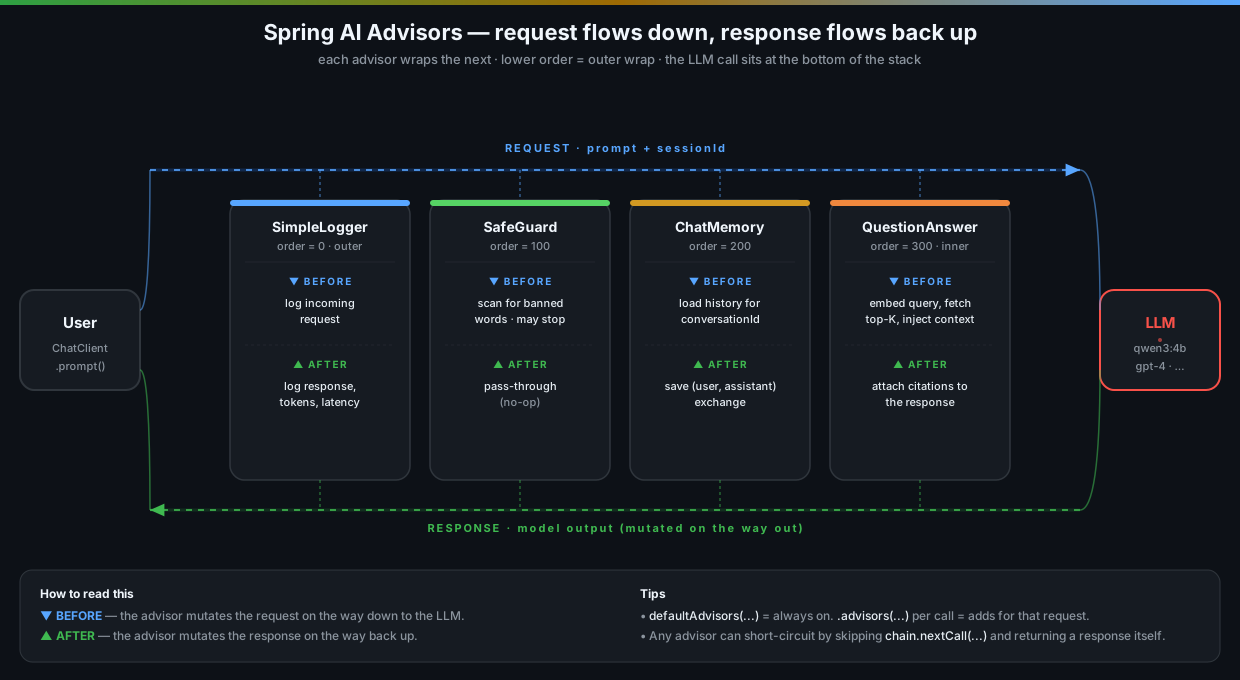
The mental model is dead simple:
- The user prompt enters the
ChatClient. - It walks down through an ordered chain of advisors. Each one can read or rewrite the request.
- The bottom of the chain calls the actual model.
- The response walks back up through the same chain, in reverse. Each advisor can read or rewrite the response.
- The final response is returned to the caller.
That’s it. It’s the Chain of Responsibility pattern with a fancy AI hat on. The reason it matters is that it lets you stack concerns — retrieval, memory, logging, safety, redaction, retries — without any one of them needing to know the others exist.
2. What’s in the Advisors Demo
Up to now we’ve been mostly consumers of advisors. In this demo we flip it around: we register a few of the built-in ones explicitly, write a couple of our own, and watch them stack.
The demo exposes four endpoints:
| Action | HTTP Method | Endpoint |
|---|---|---|
| RAG with the full advisor stack | POST |
/api/advisors/{sessionId} |
| Toggle individual advisors per request | POST |
/api/advisors/{sessionId}/toggle |
| Show the active advisor chain | GET |
/api/advisors/chain |
| Clear a session | DELETE |
/api/advisors/{sessionId} |
The code lives in AdvisorsService.java and a couple of custom advisor classes in the same package.
3. The Advisor Interface, in 30 Seconds
In Spring AI 1.0, the advisor API got cleaned up. There are two interfaces you’ll usually deal with:
CallAdvisor— for the standard request/response (.call()) flow.StreamAdvisor— for streaming responses (.stream()).
Most built-ins implement both via a base class. The shape is essentially:
public interface CallAdvisor extends Advisor {
    ChatClientResponse adviseCall(ChatClientRequest request, CallAdvisorChain chain);
    String getName();
    int getOrder();
}
You get the request, you do whatever you want to it, you call chain.nextCall(request) to keep going, you get the response back, you do whatever you want to that, you return it. The two things you control are:
getOrder()— lower numbers run first (outer wrap, closer to the caller). Higher numbers run later (inner, closer to the LLM).- What you do before/after
chain.nextCall(...)— that’s your before-and-after hook. Want to skip the LLM entirely? Don’t callchain.nextCalland return a response yourself. Want to rewrite the prompt? Build a new request and pass that into the chain instead. Want to redact the answer? Mutate the response after the call.
That’s the whole framework.
4. The Built-Ins You Already Know
Quick recap, with the order they typically run:
| Advisor | What it does | Default order |
|---|---|---|
SimpleLoggerAdvisor |
Logs request and response (great for debugging) | 0 (outer) |
SafeGuardAdvisor |
Blocks requests containing banned words; returns a canned refusal instead of calling the LLM | low |
MessageChatMemoryAdvisor |
Loads conversation history, appends the new exchange after the call | mid |
QuestionAnswerAdvisor |
Embeds the user question, retrieves top-K from the vector store, injects context | high (inner) |
RetrievalAugmentationAdvisor |
The newer, more flexible RAG advisor — query transformers, document post-processors, etc. | high (inner) |
The order matters more than you’d think. You almost always want logging on the outside (so it sees the original user input and the final response), safety filters early (before you spend tokens on something you’ll refuse anyway), memory in the middle (so it loads history before RAG embeds the query, but after safety has approved it), and retrieval on the inside (closest to the LLM, so it sees the most-massaged version of the request).
You don’t have to set order numbers manually for the built-ins — they ship with sensible defaults. But if you mix custom advisors in, you’ll want to be deliberate about it.
5. The AdvisorsService — Wiring the Stack
Here’s the constructor:
public AdvisorsService(ChatClient.Builder chatClientBuilder, VectorStore vectorStore) {
    this.vectorStore = vectorStore;

    InMemoryChatMemoryRepository memoryRepository = new InMemoryChatMemoryRepository();
    this.chatMemory = MessageWindowChatMemory.builder()
            .chatMemoryRepository(memoryRepository)
            .build();

    this.chatClient = chatClientBuilder
            .defaultSystem("""
                    You are a helpful assistant. Answer using the retrieved context
                    when relevant. If the context doesn't contain the answer, say so.
                    """)
            .defaultAdvisors(
                    new SimpleLoggerAdvisor(),
                    SafeGuardAdvisor.builder()
                            .sensitiveWords(List.of("password", "ssn", "credit card"))
                            .failureResponse("I can't help with that. Please rephrase without sensitive information.")
                            .build(),
                    MessageChatMemoryAdvisor.builder(chatMemory).build(),
                    new TokenUsageAdvisor(),       // custom — see §6
                    new PiiRedactionAdvisor()      // custom — see §6
            )
            .build();
}
Five advisors stacked, all set up once on the builder. Every call through this ChatClient automatically goes through all of them. We don’t repeat that wiring on every request.
The chat method then adds RAG per call:
public String chat(String sessionId, String message) {
    return chatClient.prompt()
            .advisors(QuestionAnswerAdvisor.builder(vectorStore)
                    .searchRequest(SearchRequest.builder().topK(4).build())
                    .build())
            .advisors(a -> a.param(ChatMemory.CONVERSATION_ID, sessionId))
            .user(message)
            .call()
            .content();
}
Two things happening:
- The first
.advisors(...)adds aQuestionAnswerAdvisorfor this specific call. It joins the existing default chain — it doesn’t replace it. - The second
.advisors(...)configures the existing memory advisor by setting theCONVERSATION_IDparameter. That’s how the sameChatMemoryinstance routes to the right session per request.
So the actual chain executing on every call ends up being:
SimpleLogger → SafeGuard → ChatMemory → TokenUsage → PiiRedaction → QuestionAnswer → LLM
…and back up the same way. That’s a lot of behaviour, declared in maybe 20 lines of code, with each piece independently testable and swappable.
6. Writing a Custom Advisor
The built-ins cover the common cases, but the moment you want anything specific to your product, you’ll be writing your own. The good news: it’s about 30 lines.
Example: a token usage tracker
Want to log how many tokens each call burns, without wiring metrics into every service? Drop in a custom advisor:
public class TokenUsageAdvisor implements CallAdvisor {

    private static final Logger log = LoggerFactory.getLogger(TokenUsageAdvisor.class);

    @Override
    public ChatClientResponse adviseCall(ChatClientRequest request, CallAdvisorChain chain) {
        long start = System.currentTimeMillis();
        ChatClientResponse response = chain.nextCall(request);
        long elapsed = System.currentTimeMillis() - start;

        Usage usage = response.chatResponse().getMetadata().getUsage();
        log.info("LLM call: {} ms, prompt={} tokens, completion={} tokens, total={}",
                elapsed,
                usage.getPromptTokens(),
                usage.getCompletionTokens(),
                usage.getTotalTokens());

        return response;
    }

    @Override public String getName()  { return "TokenUsageAdvisor"; }
    @Override public int    getOrder() { return 50; } // outer-ish, just inside the logger
}
That’s it. Drop it in defaultAdvisors(...) and now every call through that ChatClient is timed and token-accounted. No service code touched.
Example: PII redaction in the response
A second one — this time mutating the response on the way out:
public class PiiRedactionAdvisor implements CallAdvisor {

    private static final Pattern EMAIL = Pattern.compile("[A-Za-z0-9+_.-]+@[A-Za-z0-9.-]+");
    private static final Pattern PHONE = Pattern.compile("\\b(?:\\+?\\d{1,3}[ -]?)?(?:\\(?\\d{2,4}\\)?[ -]?)?\\d{3,4}[ -]?\\d{3,4}\\b");

    @Override
    public ChatClientResponse adviseCall(ChatClientRequest request, CallAdvisorChain chain) {
        ChatClientResponse response = chain.nextCall(request);

        String original = response.chatResponse().getResult().getOutput().getText();
        String redacted = EMAIL.matcher(original).replaceAll("[email]");
        redacted       = PHONE.matcher(redacted).replaceAll("[phone]");

        if (redacted.equals(original)) return response;

        // Build a new response with the redacted text. (Helper omitted for brevity —
        // see the demo source for the full ChatResponse rebuild.)
        return rebuildResponseWithText(response, redacted);
    }

    @Override public String getName()  { return "PiiRedactionAdvisor"; }
    @Override public int    getOrder() { return 250; } // after memory, before retrieval
}
Worth pointing out that this redacts the model’s output, not its input. If you want to scrub PII out of what you send to the LLM in the first place (because, say, you don’t want OpenAI seeing your customers’ emails), put the redaction logic on the request side — before chain.nextCall(...) — and run it as an outer-order advisor.
Example: a short-circuiting safety advisor
This one shows the “skip the LLM” trick. If the request looks like a prompt injection attempt, refuse without ever calling the model:
public class PromptInjectionGuardAdvisor implements CallAdvisor {

    private static final List<String> SUSPICIOUS = List.of(
            "ignore previous instructions",
            "ignore the above",
            "you are now",
            "system prompt:"
    );

    @Override
    public ChatClientResponse adviseCall(ChatClientRequest request, CallAdvisorChain chain) {
        String userText = request.prompt().getUserMessage().getText().toLowerCase(Locale.ROOT);
        boolean looksFishy = SUSPICIOUS.stream().anyMatch(userText::contains);

        if (looksFishy) {
            return cannedRefusal(request, "That request was blocked by a safety policy.");
        }
        return chain.nextCall(request);
    }

    @Override public String getName()  { return "PromptInjectionGuardAdvisor"; }
    @Override public int    getOrder() { return 75; } // before memory and RAG — don't waste tokens
}
Notice we don’t call chain.nextCall(...) in the fishy case. The chain just stops and our refusal gets returned all the way up — MessageChatMemoryAdvisor won’t store the exchange (the LLM was never called), QuestionAnswerAdvisor never runs, no tokens are spent. Clean.
This is genuinely the killer feature of the advisor pattern: any link in the chain can decide “no, we’re done here”, and the whole pipeline gracefully short-circuits.
7. Running the Demo
docker compose up -d
./mvnw spring-boot:run

# Ingest a few documents so RAG has something to retrieve
curl -s -X POST http://localhost:8080/api/basic/ingest | jq
Full advisor stack — the happy path
curl -s -X POST http://localhost:8080/api/advisors/session1 \
  -H "Content-Type: application/json" \
  -d '{"message": "What is Spring AI?"}' | jq
In your app logs you’ll now see, in order, the logger advisor printing the request, the token usage advisor printing the elapsed ms and token counts, and any other tracing you’ve added. All of it without touching the service or controller.
Triggering the safety advisor
curl -s -X POST http://localhost:8080/api/advisors/session1 \
  -H "Content-Type: application/json" \
  -d '{"message": "What is my password?"}' | jq
# → { "response": "I can't help with that. Please rephrase without sensitive information." }
The LLM was never called. SafeGuardAdvisor saw the banned word, returned the canned refusal, and the chain unwound. Check your logs — no token usage entry for this request, because the token advisor sits between the safe guard and the LLM and never got a chance to run.
Triggering PII redaction
Ask something that would coax the model into echoing an email or a phone number — say, summarising a document that contains contact info — and you’ll see the output come back with [email] and [phone] substituted in.
Inspecting the active chain
curl -s http://localhost:8080/api/advisors/chain | jqThe endpoint just walks the configured advisor list and returns their names and orders. Useful as a sanity check in any environment — particularly when someone’s been tweaking config and you want to know what’s actually running in prod.
8. Things That Will Bite You
The advisor model is small but sharp-edged. A few things worth internalising.
Order is everything
Get the order wrong and you’ll get bizarre, hard-to-debug behaviour. Classic mistakes:
- PII redaction running outside the logger — your logs now contain the un-redacted output. Whoops.
- SafeGuard running after RAG — you’ve already spent tokens on a request you were going to refuse.
- Memory running after question rewriting — your stored history has the rewritten query, not the user’s actual words. Replay and debugging become a nightmare.
When in doubt, write down the order on paper. Put logger outermost (so it sees everything), safety just inside it (so refusals are logged but cheap), retrieval innermost (so it sees the most-cooked version of the request).
Mutating responses is more painful than it should be
ChatResponse and friends are mostly immutable — for good reasons. But it means “rewrite the answer text” is not a one-liner; you have to rebuild the response object with the new content. Push that into a small helper and forget about it. The demo source has one you can copy.
Custom advisors run on every call through that client
If you only want a custom advisor on certain calls, don’t put it in defaultAdvisors(...). Put it on the per-request .advisors(...) instead. Otherwise you’ll spend a confusing afternoon wondering why your batch ingestion job is suddenly running PII redaction on every internal LLM call.
.call() and .stream() need separate implementations
If you support streaming, you need to implement StreamAdvisor too. The reactive flow is fundamentally different — you’re operating on a Flux<ChatClientResponse> rather than a single response, which means “redact the final text” requires buffering the stream. Most production apps end up with both interfaces implemented in the same class via a shared helper. Plan for it from day one if streaming is on your roadmap.
Don’t do heavy I/O in advisors without thinking
An advisor runs on every call. If your “audit advisor” writes a row to Postgres synchronously, you’ve just doubled your latency and added a new failure mode (DB down → no LLM calls). Use async dispatch, an in-memory ring buffer, or a queue — same as you would for any cross-cutting middleware.
9. Key Takeaways
-
Advisors are middleware for LLM calls. Same pattern you’ve seen a hundred times in web frameworks, applied to
ChatClient. There’s nothing magic. -
The chain composes cleanly. Logging, safety, memory, retrieval, redaction — they all stack via
defaultAdvisors(...)and don’t need to know about each other. -
Order matters and is your responsibility. Lower order = outer wrap. Get the layering wrong and you’ll log secrets, refuse late, or store the wrong thing in memory.
-
Custom advisors are tiny. A
CallAdvisoris one method. Anything cross-cutting that you’d be tempted to put in a service@Aroundaspect probably belongs in an advisor instead. -
Short-circuiting is the killer feature. Any advisor can decide not to call the chain and return a response itself — refusals, cache hits, canned answers. No tokens spent, no downstream advisors run.
Series Roadmap
| Post | Topic | What it adds |
|---|---|---|
| Post 1 | Basic RAG | End-to-end retrieval pipeline with QuestionAnswerAdvisor |
| Post 2 | Document Ingestion | Multi-format loading, custom chunk sizes, metadata enrichment |
| Post 3 | Vector Store Operations | Direct similarity search, threshold tuning, embedding inspection |
| Post 4 | Chat with Memory | Conversational RAG with per-session history and context carryover |
| → You are here | Advisors | Composing RAG + memory + safety advisors in a pipeline |
| Coming next | Structured Output | Extracting typed Java records from LLM responses |
| Function Calling | Letting the LLM invoke Java methods as tools | |
| Multi-Document RAG | Multiple document collections with smart routing | |
| Metadata Filtering | Scoping vector search with metadata filters |
Source code: github.com/gdunhao/rag-spring-ai — clone it, run
make setup && make run, and open localhost:8080 for the interactive playground.