Structured Output in Spring AI: Turning LLM Prose into Typed Java Records
Up to now, every demo in this series has happily returned a String from the LLM and called it a day. That’s fine when you’re building a chatbot — humans are great at reading prose. It is not fine when the next thing in your pipeline is, say, a React component, a Postgres INSERT, or a Kafka producer. None of those want a paragraph. They want a record, an object, a row.
This is the post where we stop treating the LLM as a chat partner and start treating it as a typed function. Everything maps to Demo 6: Structured Output in the rag-spring-ai project.
1. The Problem with String
Here’s a real moment that makes you reach for structured output. You’ve built a beautiful RAG endpoint, your frontend dev pings you, and you say “yeah just hit /api/basic and parse the answer”. They look at the response and the conversation goes:
“What field is the price in?” “It’s… in the sentence.” “Which sentence?” “The one that says the price.”
That’s the moment. You don’t want the LLM to describe the data — you want it to return the data. Something like:
❌  "The pricing plans are Starter at $29/month, Professional at $79/month..."
✅  FaqEntry(question="...", answer="...", category="pricing")
The first one is a sentence. The second one is something you can JOIN on.
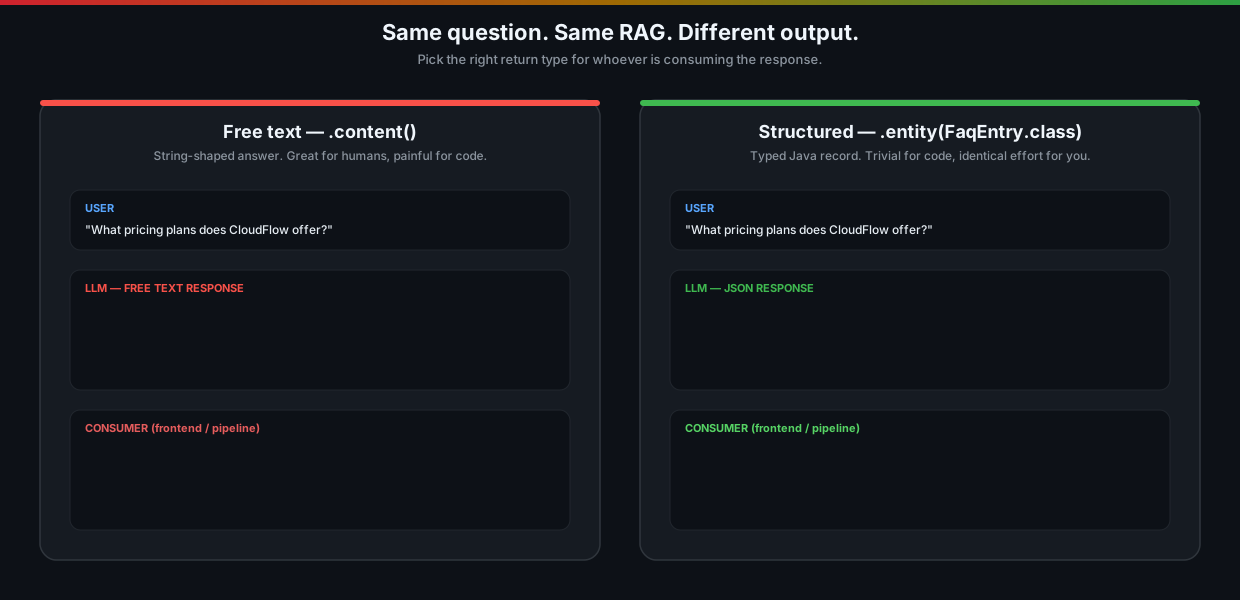
.entity(FaqEntry.class).2. What Spring AI Is Actually Doing
There’s no magic here, and it’s worth knowing what’s happening because the moment something goes wrong you’ll want to debug it without wading through stack traces.
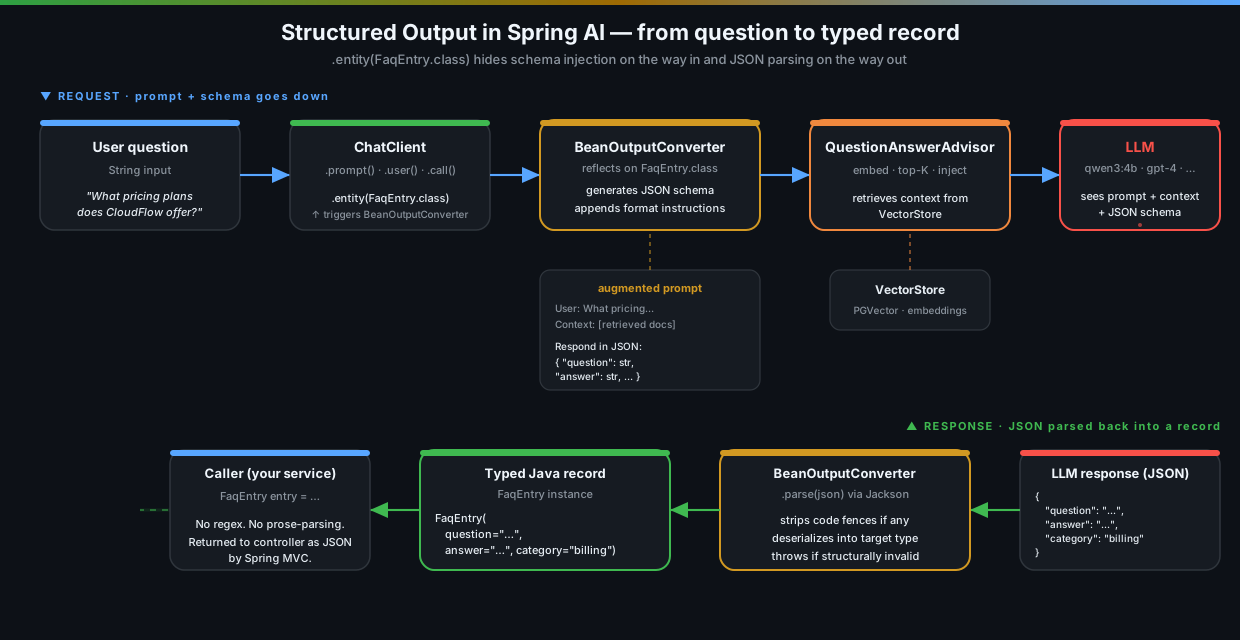
When you call .entity(SomeRecord.class) on a ChatClient, Spring AI uses something called BeanOutputConverter and does three things:
- Schema generation. It reflects on your record/class and builds a JSON schema for it.
- Prompt augmentation. It quietly tacks an instruction onto your prompt that looks something like “respond in the following JSON format: { …schema… }”.
- Response parsing. When the LLM responds (hopefully with valid JSON), it parses that JSON into your target type with Jackson.
That’s the whole thing. It’s not a fine-tuned model, it’s not a special API mode (although on providers that do offer a JSON mode, Spring AI will use it). It’s just disciplined prompting plus a parser, with a clean API on top.
The honest caveat: the LLM still has to cooperate. With a small local model (we’re using qwen3:4b in the demo) you’ll occasionally see it return { "answer": "..." } when you asked for { "question", "answer", "category" }, or sneak in a Markdown code fence around the JSON. We’ll get to handling that in Section 6.
3. What’s in the Demo
Three endpoints, three different shapes of structured response. They all do RAG over the same vector store from previous posts — only the output type changes.
| Action | HTTP Method | Endpoint | Returns |
|---|---|---|---|
| FAQ extraction | POST |
/api/structured/faq |
FaqEntry (single object) |
| Legal clause extraction | POST |
/api/structured/legal |
List<LegalClause> |
| API endpoint extraction | POST |
/api/structured/api |
List<ApiEndpoint> |
The records:
public record FaqEntry(String question, String answer, String category) {}

public record LegalClause(String section, String title, String summary, String relevance) {}

public record ApiEndpoint(String method, String path, String description, String parameters) {}
Three shapes worth pointing out: a single object, a list of objects, and… well, a list of objects again, but with different fields. That covers about 90% of what you’ll do in a real codebase.
4. The Service — One Method, One Magic Call
Here’s the FAQ extraction in full. It’s almost embarrassingly short:
public FaqEntry extractFaqEntry(String question) {
    return chatClient.prompt()
            .system("""
                    You are an FAQ specialist. Based on the retrieved context, create a
                    structured FAQ entry with the question, a clear answer, and the category.
                    """)
            .advisors(QuestionAnswerAdvisor.builder(vectorStore).build())
            .user(question)
            .call()
            .entity(FaqEntry.class);  // ← the only new thing
}
Compare that to every other RAG method we’ve written so far — it’s identical except for the last line. We swapped .content() (returns String) for .entity(FaqEntry.class) (returns FaqEntry). The schema injection, the JSON parsing, all of it: hidden behind that one method.
For lists you reach for ParameterizedTypeReference because Java generics get erased and Spring AI needs to see the inner type:
public List<LegalClause> extractLegalClauses(String query) {
    return chatClient.prompt()
            .system("""
                    You are a legal document analyst. Based on the retrieved context,
                    extract relevant legal clauses. Return a list of clauses with their
                    section, title, summary, and relevance level (HIGH, MEDIUM, LOW).
                    """)
            .advisors(QuestionAnswerAdvisor.builder(vectorStore).build())
            .user("Find clauses related to: " + query)
            .call()
            .entity(new ParameterizedTypeReference<List<LegalClause>>() {});
}
Same shape. Different return type. Same ChatClient, by the way — built once in the constructor with SimpleLoggerAdvisor so you can see the actual schema-augmented prompt in the logs. That’s the fastest way to convince yourself the magic isn’t really magic.
5. Designing Records the LLM Will Actually Fill Correctly
This is the part that the docs gloss over and that you only learn from getting bitten. The shape of your record affects how reliably the LLM produces valid output. A few rules of thumb.
Use String for almost everything
I know, I know — you want BigDecimal price and LocalDate publishedAt. Resist the urge, at least at first. Strings are the most forgiving target for an LLM to fill: there’s no “wrong format” except an empty string. You can parse and validate them downstream where you control the error handling, instead of having the entire response fail to deserialize because the model wrote "$29/month" and you asked for a double.
If you do use typed numerics or dates, expect to validate, retry, or coerce.
Be careful with enums
Relevance.HIGH | MEDIUM | LOW looks great on paper. In practice the LLM will eventually return "high", or "Important", or — my favourite — "VERY_HIGH" because it decided your enum wasn’t expressive enough. If you must use enums, use Jackson’s case-insensitive deserialization and have a default fallback, or just use a String and validate on your side.
Keep records flat
Deep nesting like Order.customer.address.city makes the schema explode and gives the model more chances to mess up which level a field belongs to. Flatten where you can. If you need composition, do it after parsing.
Use field names the LLM can read
The LLM literally sees the schema and uses field names as semantic hints. String summary is way better than String s. String releaseDate is way better than String dt. Treat field names as part of the prompt, because they are.
Don’t put 25 fields in one record
The longer the schema, the more room for the model to forget a field, get the order wrong, or hallucinate a value. If you find yourself with a 25-field record, decompose the request into multiple smaller calls — one per logical chunk — and stitch them together in code.
6. When the LLM Returns Garbage (Because It Will)
Sooner or later you’ll get a JsonParseException and a stack trace at 11pm. Here’s what to do about it.
Wrap with retry
The simplest, cheapest, and surprisingly effective fix: just try again. Most “the LLM returned malformed JSON” errors are transient — the second attempt almost always works. Spring Retry, Resilience4j, or a tiny three-line retry loop are all fine.
public FaqEntry extractFaqEntryWithRetry(String question) {
    int attempts = 3;
    Exception last = null;
    for (int i = 0; i < attempts; i++) {
        try {
            return extractFaqEntry(question);
        } catch (Exception e) {
            last = e;
            log.warn("Structured output attempt {}/{} failed: {}", i + 1, attempts, e.getMessage());
        }
    }
    throw new IllegalStateException("LLM failed to produce valid output after " + attempts + " attempts", last);
}
Validate after parsing
Just because Jackson parsed it doesn’t mean the values are sane. The LLM might return "category": "" or "relevance": "kind of important". Use Bean Validation (@NotBlank, @Pattern, @Size) on your records and fail fast — then your retry loop catches it and tries again.
Log the raw response when things go wrong
This is non-negotiable. When parsing fails, you want the exact string the LLM produced, with code fences and apologetic prose intact. Otherwise you’re guessing. The SimpleLoggerAdvisor already gives you the response text — keep it on in dev and staging.
Lower the temperature
Structured output is one of the few cases where you almost always want temperature = 0 (or as low as your provider allows). You’re not asking for creativity, you’re asking for a form to be filled in. Determinism is a feature here.
7. Running the Demo
docker compose up -d
./mvnw spring-boot:run

# Ingest a few documents so RAG has something to retrieve
curl -s -X POST http://localhost:8080/api/basic/ingest | jq
A single typed object
curl -s -X POST http://localhost:8080/api/structured/faq \
  -H "Content-Type: application/json" \
  -d '{"question": "What pricing plans does CloudFlow offer?"}' | jq
You get back something like:
{
  "question": "What pricing plans does CloudFlow offer?",
  "answer": "CloudFlow offers three plans: Starter ($29/month), Professional ($79/month), and Enterprise (custom pricing).",
  "category": "billing"
}
That’s a Java FaqEntry instance, serialized to JSON by Spring MVC the same way any other controller return value would be. No prose anywhere. Your frontend dev is happy. You are happy.
A list of objects
curl -s -X POST http://localhost:8080/api/structured/legal \
  -H "Content-Type: application/json" \
  -d '{"query": "data privacy and user content"}' | jq
[
{
"section": "4",
"title": "User Content and Data",
"summary": "Users retain ownership of uploaded content. CloudFlow only uses it to provide the service.",
"relevance": "HIGH"
}
]Notice this came back as an array, with relevance correctly slotted into the enum-y string we asked for. If you check the app logs (thanks to SimpleLoggerAdvisor), you’ll see the prompt that actually went to the model — your system prompt, the retrieved context from RAG, and an auto-appended block telling the LLM exactly which JSON schema to fill in. That’s BeanOutputConverter at work.
Same idea, different shape
curl -s -X POST http://localhost:8080/api/structured/api \
  -H "Content-Type: application/json" \
  -d '{"query": "document upload and management"}' | jq
You get an array of ApiEndpoint records. Same recipe.
8. When You Should (and Shouldn’t) Reach for This
A short opinionated list, because nobody needs another “it depends”.
Use structured output when:
- The next consumer of the response is code, not a human.
- You’re building an API that returns LLM-generated data.
- You want to drive UI tables, charts, or comparisons.
- You’re in a pipeline and need to pass the result to another step.
- You want to validate the output before showing it to a user.
Don’t use it when:
- You’re building a chatbot. Chatbots return prose. Prose is fine.
- The shape of the answer is unpredictable. If sometimes you want a list and sometimes a paragraph, don’t try to coerce both into one record — make two endpoints.
- The data you want is genuinely free-form (e.g., creative writing, summaries longer than a paragraph). Forcing that into a schema is fighting the model.
9. Things That Will Bite You
A few smaller traps that aren’t worth their own section.
“It worked yesterday”
LLM behaviour drifts. A schema that the model filled correctly 100 times in a row will, eventually, fail. Treat structured output like any other flaky integration: retries, validation, observability. Don’t write code that assumes parsing will always succeed.
Token cost goes up
The schema instruction Spring AI appends is not free — it’s tokens going to the model on every request, and longer for bigger schemas. For high-volume endpoints, keep your records lean or consider a model with a JSON mode (which doesn’t need the schema in-prompt).
Streaming + structured output is awkward
You can’t really “stream” a typed object — by definition you need the whole JSON before parsing. Spring AI’s .entity() only makes sense on .call(), not .stream(). If you need both, send the typed call alongside a streaming call for UI feedback, or stream the raw JSON and parse on the client.
Don’t put .entity() on top of an advisor that mutates the response
Remember advisors? If you’ve stacked something like PiiRedactionAdvisor that rewrites the response text, and then call .entity(SomeRecord.class), you might be parsing redacted-but-not-quite-JSON. Test the combo end to end. Order, again, matters.
Local models struggle more than hosted ones
qwen3:4b is great for a demo, but it will fumble structured output more often than gpt-4o or claude-3.5-sonnet. If you’re benchmarking reliability, do it on the model you’ll ship with — not on a 4B parameter model running on your laptop.
10. Key Takeaways
-
.entity(Class)is the entire API. SameChatClient, same prompt, same RAG advisor — change the last method call, get a typed object instead of a String. -
It’s prompt engineering with a parser, not a special model mode. Spring AI generates a schema, appends format instructions, and parses the response. Knowing this makes debugging straightforward.
-
Design records for the LLM, not for your domain model. Strings beat enums. Flat beats nested. Short beats long. Convert to your real domain objects after parsing if you need to.
-
Always have a retry-and-validate loop in production. The LLM will eventually return invalid JSON. Plan for it. Three attempts plus Bean Validation handles 99% of cases.
-
Use it when the next consumer is code, not a human. Don’t try to make a chatbot return JSON; don’t try to render free-form prose from a schema. Pick the right tool for the job.
Series Roadmap
| Post | Topic | What it adds |
|---|---|---|
| Post 1 | Basic RAG | End-to-end retrieval pipeline with QuestionAnswerAdvisor |
| Post 2 | Document Ingestion | Multi-format loading, custom chunk sizes, metadata enrichment |
| Post 3 | Vector Store Operations | Direct similarity search, threshold tuning, embedding inspection |
| Post 4 | Chat with Memory | Conversational RAG with per-session history and context carryover |
| Post 5 | Advisors | Composing RAG + memory + safety advisors in a pipeline |
| → You are here | Structured Output | Extracting typed Java records from LLM responses |
| Coming next | Function Calling | Letting the LLM invoke Java methods as tools |
| Multi-Document RAG | Multiple document collections with smart routing | |
| Metadata Filtering | Scoping vector search with metadata filters |
Source code: github.com/gdunhao/rag-spring-ai — clone it, run
make setup && make run, and open localhost:8080 for the interactive playground.