Function Calling in Spring AI: Letting the LLM Press the Buttons
So far in this series the LLM has been a very polite librarian — we ask it questions, it goes to the vector store, it reads us a nicely worded answer. That’s RAG. It’s great. It’s also, eventually, not enough.
At some point a user will type “my account is locked, please help” and what they actually need isn’t a paragraph from the FAQ — they need a ticket created in your support system. Or they’ll ask “what’s the status of order ORD-001?” and the answer doesn’t live in any document, it lives in your database. The LLM can’t help with either of those by reading more text. It needs to do something.
That’s what function calling (also called tool use) is for. This post maps to Demo 7: Function Calling in the rag-spring-ai project.
1. What “Function Calling” Actually Means
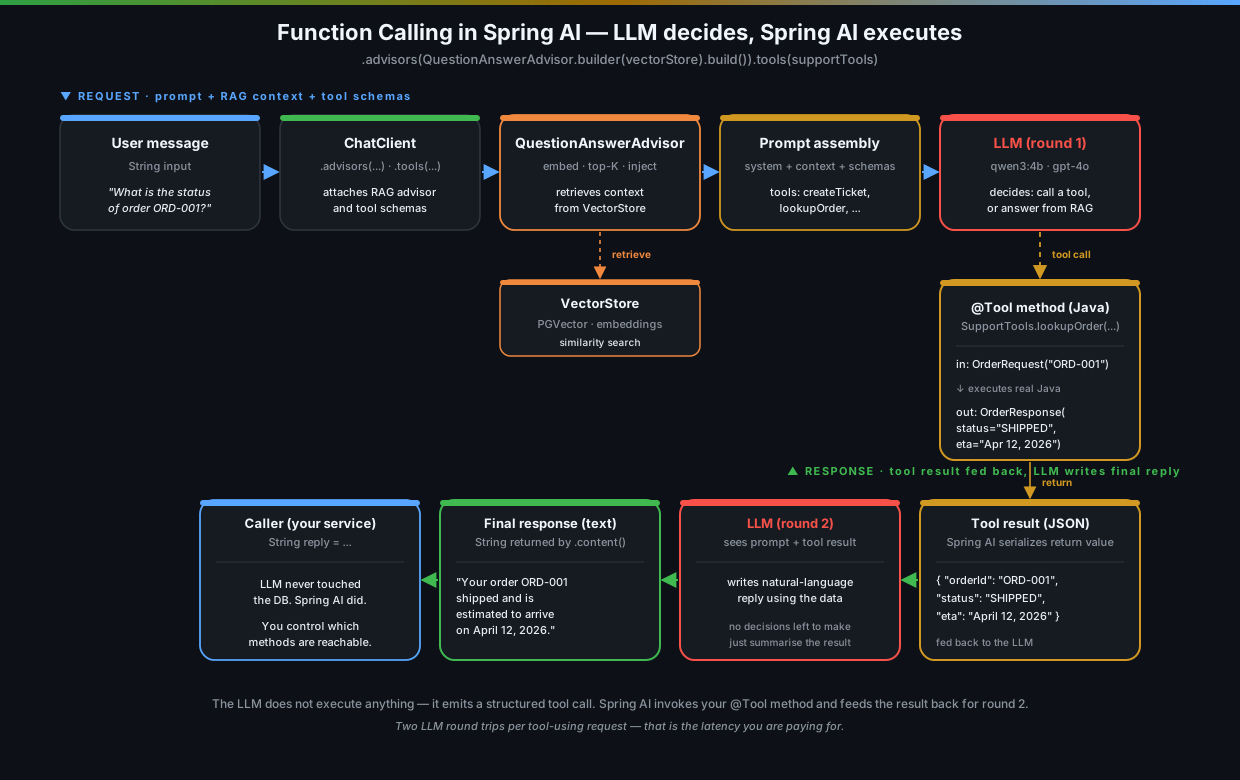
Forget the buzzword for a second. Here’s what’s really happening:
- You give the LLM a list of functions you’ve written, with names, descriptions, and the shape of their arguments.
- The LLM reads the user question and decides: “can I answer this from what I already know? Or do I need to call one of those functions?”
- If it decides to call a function, it doesn’t actually run anything — it just emits a structured request: “please call
lookupOrderwith{ orderId: 'ORD-001' }“. - Spring AI catches that request, invokes your real Java method, takes the return value, and hands it back to the LLM.
- The LLM uses that return value to write the final reply.
The LLM is the one choosing. You’re the one executing. This separation matters — the LLM never touches your database, your APIs, or your network. It just suggests calls. You decide which methods are even reachable.
2. Why You’d Reach for This
Function calling is what turns a chatbot into something that can actually run a workflow. A few concrete cases:
- Side effects. Create a ticket, send an email, refund a payment, kick off a job. Anything you can’t get from reading documents.
- Live data. Order status, weather, inventory levels, currency rates — anything that’s a database query or an API call away.
- Computation. Math, date arithmetic, unit conversion. LLMs are notoriously bad at arithmetic — let them call a Java method that gets it right.
- Branching workflows. “If the FAQ doesn’t cover it, escalate to a human.” The LLM looks at the retrieved context, sees nothing relevant, and reaches for
createTicket.
That last one is the killer combination with RAG. You’re not picking RAG vs. tools — you give the LLM both, and it picks per question.
3. The Old Way vs. the Spring AI 1.0 Way
If you’re coming from an earlier Spring AI snapshot, this part has changed and the old code does not work anymore. Quick history:
- Before 1.0: you registered a
Function<Input, Output>as a@Beanwith@Description, and passed the bean name as a string to.functions("orderLookup"). It worked, but the strings were brittle and the API was awkward. - Spring AI 1.0: you write a normal class with normal methods, annotate the methods with
@Tool(description = "..."), and pass the object instance to.tools(myToolObject). Spring AI introspects the class and figures out the rest.
Much nicer. Much more Java-shaped. Less time pretending your Spring beans are functional programming.
4. Defining Tools — Just Annotated Methods
There’s no special interface to implement, no abstract class to extend. A tool is a public method on a regular class with a @Tool annotation. Here’s the support tools class from the demo, trimmed down:
public static class SupportTools {

    @Tool(description = "Create a customer support ticket. Use this when the customer's issue cannot be resolved from the FAQ and needs human intervention.")
    public TicketResponse createTicket(TicketRequest request) {
        String ticketId = "TKT-" + UUID.randomUUID().toString().substring(0, 8).toUpperCase();
        return new TicketResponse(ticketId, "OPEN",
                "Ticket created for: " + request.issue() + " (Priority: " + request.priority() + ")",
                LocalDateTime.now().toString());
    }

    @Tool(description = "Look up the status of a customer order by order ID. Use this when a customer asks about their order status.")
    public OrderResponse lookupOrder(OrderRequest request) {
        // ... pretend this hits a real DB
    }
}
A few things worth noticing because they affect whether the LLM uses the tool correctly:
- The
descriptionis a prompt, not a Javadoc. It’s the only thing the LLM has to decide when to call this method. Write it like you’re explaining it to a coworker who has never seen your codebase. “Create a customer support ticket. Use this when…” is good. “Creates ticket” is not. - The parameter type becomes a JSON schema. Records are perfect for this —
TicketRequest(String customerName, String issue, String priority)reads as a clean schema with three string fields. The model fills it in. - The return type also becomes a schema — Spring AI serializes whatever you return as JSON and feeds it back into the prompt for the LLM to summarise. So return small, focused records, not your full domain entities.
- Field names matter. Same rule as the structured output post —
orderIdis much more useful to the LLM thanid.
Then you register the tool class as a Spring bean so you can inject it:
@Configuration
public class FunctionConfig {

    public static class SupportTools { /* ... @Tool methods ... */ }
    public static class WeatherTools { /* ... @Tool methods ... */ }

    @Bean public SupportTools supportTools() { return new SupportTools(); }
    @Bean public WeatherTools weatherTools() { return new WeatherTools(); }
}
That’s the entire setup. No registry, no descriptor objects, no JSON files describing your tools.
5. Wiring It Into the ChatClient
Now the fun part — the call site. This is where RAG and tool use sit together in one short method:
public String handleSupportRequest(String userMessage) {
    return chatClient.prompt()
            .system("""
                    You are a customer support agent for CloudFlow. First, check the
                    knowledge base for relevant information. If you can answer the
                    question directly from the FAQ or documentation, do so. If the
                    issue requires human intervention or is not covered in the
                    knowledge base, use the createTicket tool to create a support ticket.
                    """)
            .advisors(QuestionAnswerAdvisor.builder(vectorStore).build())   // ← RAG
            .tools(supportTools)                                            // ← tools
            .user(userMessage)
            .call()
            .content();
}
That’s it. One .tools() call, one tool object. You can pass several:
.tools(weatherTools, supportTools)…and the LLM sees them all in a flat namespace. Method names need to be unique across the tools you pass in (which is just basic hygiene anyway — don’t have two methods called lookup).
The system prompt is doing real work here. “First, check the knowledge base. If you can answer from there, do so. Otherwise use createTicket.” That’s not flavour text — that’s the routing logic, written in plain English and enforced (mostly) by the model. You’re going to spend a non-trivial chunk of your time on tool projects rewriting these prompts. That’s normal.
6. How the LLM Decides
People always ask this and the honest answer is “with vibes, mostly”. But there’s structure underneath, and it’s worth understanding so you can debug when the model picks the wrong path.
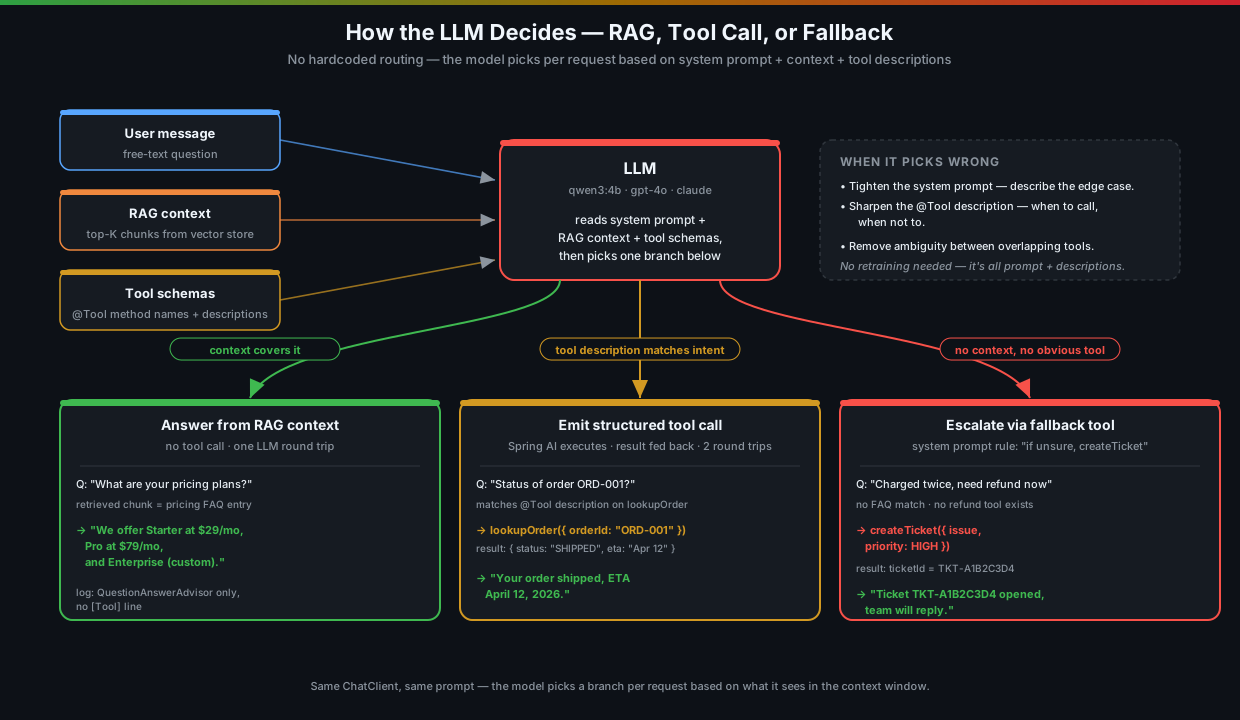
For each request the LLM sees:
- Your system prompt (the routing rules you wrote).
- The retrieved RAG context (chunks the advisor pulled from the vector store).
- A list of tool schemas with their descriptions.
- The user message.
It then weighs them. “Is the answer in the context? Yes? Then I don’t need a tool.” Or: “This looks like an order status question, and there’s a tool literally called lookupOrder whose description mentions order status. I’ll call that.” Or: “Nothing matches. I’ll create a ticket because the system prompt told me to do that when nothing else fits.”
When it picks wrong, the fix is almost always one of:
- Tighten the system prompt. Add a sentence describing the new edge case it stumbled on.
- Sharpen the tool description. Be explicit about when to call and when not to.
- Remove ambiguity. If two tools could plausibly handle the same request, the model will dither. Merge them or make their descriptions clearly disjoint.
7. Running the Demo
The setup is the usual one for this series:
docker compose up -d        # Postgres + pgvector + Ollama
./mvnw spring-boot:run

# Seed the vector store so RAG has something to retrieve
curl -s -X POST http://localhost:8080/api/basic/ingest | jq
A question the FAQ can answer (no tool call)
curl -s -X POST http://localhost:8080/api/function/support \
  -H "Content-Type: application/json" \
  -d '{"message": "What are your pricing plans?"}'
The LLM checks the RAG context, finds the pricing chunk, and answers in prose. Notice no tool call happened — check the logs and you’ll see only the QuestionAnswerAdvisor lines, no [⚙Tool] line.
A question that needs createTicket
curl -s -X POST http://localhost:8080/api/function/support \
  -H "Content-Type: application/json" \
  -d '{"message": "My account has been charged twice this month and I need a refund immediately"}'
Now the logs tell a story:
[→VectorDB] Similarity search via QuestionAnswerAdvisor | message='My account has been charged...'
[→Ollama]   Chat request | model=qwen3:4b | tools=SupportTools | message='...'
[⚙Tool]     createTicket invoked by Ollama | customer='...' | issue='Account charged twice...' | priority=HIGH | ticketId=TKT-A1B2C3D4
[⚙Tool]     createTicket result | ticketId=TKT-A1B2C3D4 | status=OPEN
[←Ollama]   Response received | chars=312 | elapsed=84231ms
Two LLM round trips happened in the background — one to decide and emit the tool call, one to write the final reply after seeing the ticket result. The user just sees a polite “I’ve created ticket TKT-A1B2C3D4 for your billing issue, our team will reach out within 24 hours.”
A question that picks between several tools
curl -s -X POST http://localhost:8080/api/function/ask \
  -H "Content-Type: application/json" \
  -d '{"question": "What is the weather like in Tokyo?"}'

curl -s -X POST http://localhost:8080/api/function/ask \
  -H "Content-Type: application/json" \
  -d '{"question": "What is the status of order ORD-001?"}'

curl -s -X POST http://localhost:8080/api/function/ask \
  -H "Content-Type: application/json" \
  -d '{"question": "What vector stores does Spring AI support?"}'
Three questions, three different paths: getWeather, lookupOrder, and no tool at all (the third one is answered straight from the RAG context). Same endpoint, same chat client, same prompt — the LLM picks per request.
8. Things That Will Trip You Up
Some of these I learned the hard way. None of them are dealbreakers, but they’re the difference between a demo that works once and a service you ship.
Latency multiplies
A tool-using request is at least two LLM round trips, sometimes three or four if the model chains calls. With a small local model like qwen3:4b on CPU you’re looking at 60–180 seconds per request. That’s fine for a demo on your laptop, not fine for a synchronous API.
Practical things that help: bump spring.ai.ollama.client.read-timeout, run on a hosted provider for the real workload, or move tool-using endpoints behind a job queue so the user gets a “we’re working on it” instead of a hung HTTP request.
Smaller models hallucinate tool calls
qwen3:4b is good enough for the demo, but it will occasionally:
- Invent a tool that doesn’t exist (
refundOrderwhen you only havecreateTicket). - Get the argument names wrong (
order_idinstead oforderId). - Skip the tool entirely and just describe what it would do.
Spring AI handles the first two reasonably — invalid calls just fail and the model retries — but the last one is on you. The fix is the same as before: stronger system prompt, sharper tool descriptions, and ideally a model with better tool-use training (most 8B+ models, plus all the hosted ones, are noticeably better).
The LLM controls your method’s arguments. Treat them like user input.
This is the single most important point on the page. The arguments to your @Tool methods are LLM-generated, which means they’re effectively user input. A user could phrase a message in a way that makes the LLM call createTicket(customerName="'; DROP TABLE tickets; --", ...). The LLM has no idea your backend exists, let alone your SQL.
So:
- Validate every input (
@NotBlank,@Pattern, length limits). - Use parameterised queries, parameterised everything.
- Apply the same authorization checks you’d apply to a real HTTP endpoint — “is this user allowed to look up this order?” — because the LLM will happily ask for someone else’s order ID.
- For destructive actions (delete, refund, deploy), don’t just execute — return a confirmation token and require a second human-approved step. Same advice as the human-in-the-loop pattern from the agents post.
Idempotency saves you
Because the LLM can chain or retry calls (especially when you add retries on top), your tool methods will sometimes be called twice with the same arguments. If createTicket always opens a fresh ticket, you’ll occasionally end up with duplicates. Either dedupe by a content hash, accept a client-supplied idempotency key, or just be okay with the noise. Pick consciously.
Don’t put a BankTransferTool in your demo
Or, if you do, gate it behind a mock. The first time you let a model with weak tool-use training loose on a real payment API, you’ll find out it’s surprisingly creative about why “now seems like a good time to transfer $1,000”. Start every tool integration in dry-run mode.
Tools and .entity() don’t combine well
If you call .entity(SomeRecord.class) and pass .tools(...) in the same request, things get ambiguous fast — the model is being asked to both fill a schema and decide whether to call a tool, and it sometimes returns the tool-call args as if they were the structured output. Pick one per call: free-text + tools, or structured-output, but not both. If you really need a typed result after a tool call, do the tool call first and then run a second .entity() call over the textual answer.
9. Where This Sits in the Bigger Picture
Function calling is the bridge between the “LLM as text generator” world we’ve been in for the last six posts, and the “LLM as autonomous agent” world I covered in the AI Agents series. A single ReAct agent, when you squint, is just a tool-using LLM in a loop — same @Tool methods, same decision pattern, with the addition of a “keep going until done” control structure.
For RAG specifically, function calling unlocks the workflows you couldn’t build before:
- Escalation paths — “if you can’t answer, file a ticket.”
- Live data lookups — “if it’s about an order, hit the orders service.”
- Actions — “if the user confirms, send the email.”
You don’t need a full agent framework to get these. You need one ChatClient.prompt().advisors(...).tools(...).call(). That’s the whole story.
10. Key Takeaways
-
Tools are just
@Tool-annotated methods on a regular class. No interfaces, no descriptors, no JSON files. Pass the object instance to.tools(...). -
The
descriptionis the prompt. That’s how the LLM decides when to call. Write it like documentation for a coworker, not like a method comment. -
You execute, the LLM only suggests. Spring AI catches the suggested call, invokes your method, and feeds the return value back. The LLM never touches your systems directly.
-
Combine tools with RAG in one call.
.advisors(...)for retrieval,.tools(...)for actions. The LLM picks per question — answer from context, or call a tool, or both in sequence. -
Treat tool arguments as user input. Validate, authorize, sandbox. The LLM is, effectively, a very persuasive untrusted user typing into your method signatures.
-
Latency adds up and small models wobble. Plan for multiple round trips, async patterns, and the fact that tool use is the first place where a 4B parameter model will start visibly struggling.
Series Roadmap
| Post | Topic | What it adds |
|---|---|---|
| Post 1 | Basic RAG | End-to-end retrieval pipeline with QuestionAnswerAdvisor |
| Post 2 | Document Ingestion | Multi-format loading, custom chunk sizes, metadata enrichment |
| Post 3 | Vector Store Operations | Direct similarity search, threshold tuning, embedding inspection |
| Post 4 | Chat with Memory | Conversational RAG with per-session history and context carryover |
| Post 5 | Advisors | Composing RAG + memory + safety advisors in a pipeline |
| Post 6 | Structured Output | Extracting typed Java records from LLM responses |
| → You are here | Function Calling | Letting the LLM invoke Java methods as tools |
| Coming next | Multi-Document RAG | Multiple document collections with smart routing |
| Metadata Filtering | Scoping vector search with metadata filters |
Source code: github.com/gdunhao/rag-spring-ai — clone it, run
make setup && make run, and open localhost:8080 for the interactive playground.