Multi-Document RAG with Spring AI: Multiple Collections, Smart Routing, and Cleaner Top-K
Every demo in this series so far has lived inside one cosy little vector store. We dumped a CloudFlow FAQ into it, asked some questions, and got nice answers. That’s also pretty much how every “your first RAG app” tutorial on the internet ends — and it’s also exactly where real projects start to fall apart.
Because in the real world you don’t have one document. You have the customer FAQ, plus the terms of service, plus the API guide your platform team owns, plus the HR policies that legal is very opinionated about. Stuffing all of that into a single embedding bucket is a great way to get top-K results that mix billing chunks with parental leave chunks and confidently summarise both.
This post is about giving each domain its own room. It maps to Demo 8: Multi-Document RAG in the rag-spring-ai project.
1. The Real Problem: Context Pollution
Imagine you’ve ingested four files into one VectorStore:
customer-faq.txt— pricing, plans, supportterms-of-service.txt— legal stuffapi-guide.txt— REST endpointshr-policies.txt— PTO, benefits, conduct
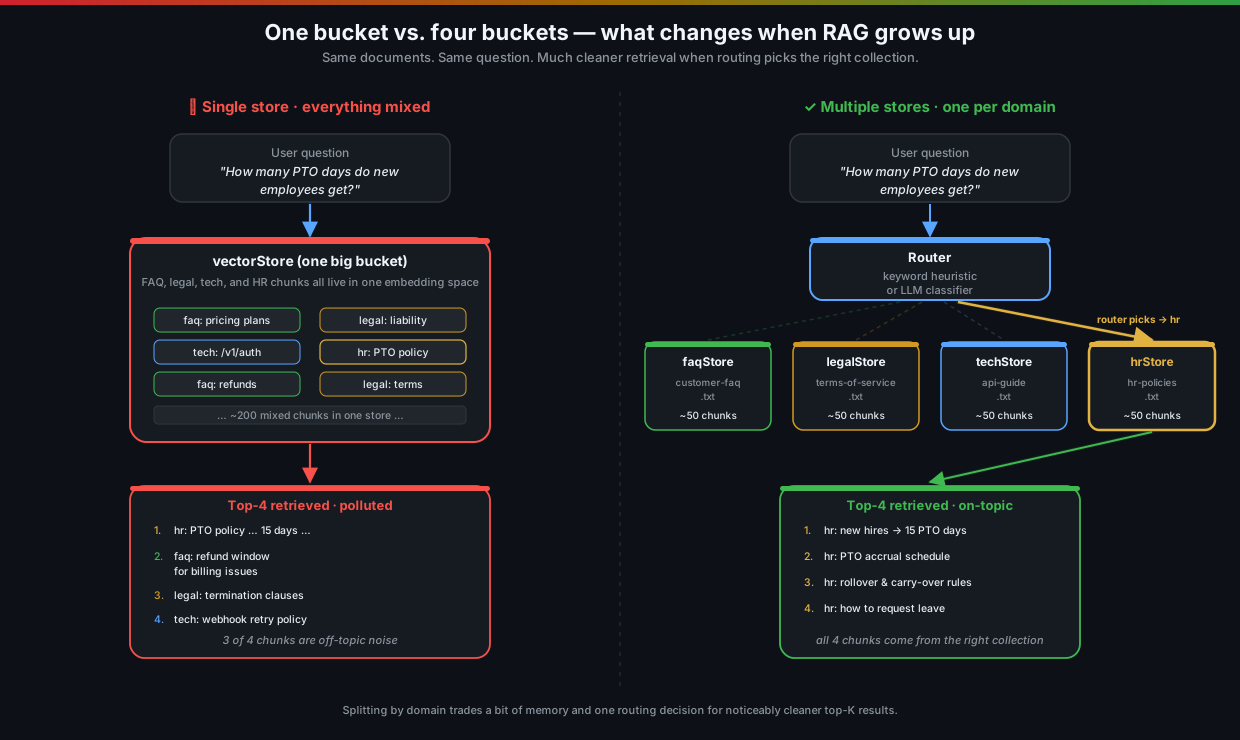
A user asks “How many PTO days do new employees get?” and the retriever, doing its honest job, returns the top-4 chunks by cosine similarity. One of them is the correct HR chunk. The other three? A refund policy from the FAQ (because it mentions “days”), a termination clause from legal (because it mentions “employees”), and a webhook retry config from the API guide (because the embedding space is weird sometimes).
The LLM now has to write an answer about PTO with three irrelevant chunks in its context. Best case: it ignores them and answers correctly. Common case: it confidently mixes in a sentence about refund windows. Worst case: it hallucinates a synthesis of all four.
That’s context pollution, and it’s the single best argument for splitting your documents into separate collections.
2. The Fix in One Sentence
Create one VectorStore per document domain. When a query comes in, decide which store to ask. Hit only that one.
That’s the entire pattern. Everything else in this post is how to wire it up cleanly in Spring AI and how to decide which store to pick.
3. The Service — One Store Per Domain
Here’s the shape of MultiDocService, trimmed to the parts that matter. Notice we build the stores once at startup with @PostConstruct, and we cache one QuestionAnswerAdvisor per store rather than re-creating advisors on every request:
@Service
public class MultiDocService {

    private final ChatClient chatClient;
    private final EmbeddingModel embeddingModel;

    private QuestionAnswerAdvisor faqAdvisor;
    private QuestionAnswerAdvisor legalAdvisor;
    private QuestionAnswerAdvisor techAdvisor;
    private QuestionAnswerAdvisor hrAdvisor;

    public MultiDocService(
            ChatClient.Builder chatClientBuilder,
            EmbeddingModel embeddingModel,
            @Value("classpath:documents/faq/customer-faq.txt")     Resource faqDocument,
            @Value("classpath:documents/legal/terms-of-service.txt") Resource legalDocument,
            @Value("classpath:documents/techdocs/api-guide.txt")    Resource techDocument,
            @Value("classpath:documents/hr/hr-policies.txt")        Resource hrDocument) {
        this.chatClient = chatClientBuilder
                .defaultAdvisors(new SimpleLoggerAdvisor())
                .build();
        this.embeddingModel = embeddingModel;
        // store the resources for @PostConstruct
        // ...
    }

    @PostConstruct
    public void init() {
        faqAdvisor   = advisorFor(createAndIngest(faqDocument,   "customer-faq",     "faq"));
        legalAdvisor = advisorFor(createAndIngest(legalDocument, "terms-of-service", "legal"));
        techAdvisor  = advisorFor(createAndIngest(techDocument,  "api-guide",        "technical"));
        hrAdvisor    = advisorFor(createAndIngest(hrDocument,    "hr-policies",      "hr"));
    }

    private VectorStore createAndIngest(Resource resource, String source, String collection) {
        SimpleVectorStore store = SimpleVectorStore.builder(embeddingModel).build();
        var reader = new TextReader(resource);
        reader.getCustomMetadata().put("source", source);
        reader.getCustomMetadata().put("collection", collection);
        List<Document> chunks = new TokenTextSplitter().apply(reader.get());
        store.add(chunks);
        return store;
    }

    private QuestionAnswerAdvisor advisorFor(VectorStore store) {
        return QuestionAnswerAdvisor.builder(store).build();
    }
}
A few things worth pointing out, because they’re the kind of decisions that are easy to skip past on a first read:
- One
EmbeddingModel, many stores. All four collections share the same embedding model. They have to — otherwise their vectors live in incompatible coordinate spaces and you can never compare anything across them. Don’t get clever here. SimpleVectorStoreis fine for the demo. It’s in-memory, so when the app restarts you re-ingest. For real workloads swap inPgVectorStore,RedisVectorStore, etc., one per collection (or one shared store with acollectionmetadata field — more on that in a second).- Advisors are cached. Building a
QuestionAnswerAdvisorisn’t expensive, but creating four of them per request when you already know which four you’ll need is just sloppy. We build them once ininit(). - Metadata is set at ingestion time. Every chunk carries
sourceandcollectionmetadata. Even if you never use it for filtering, it’s gold for debugging — when you log retrieved chunks you can immediately tell which file they came from.
Wait — couldn’t I just use one store with a
collectionmetadata filter? Yes. That’s the third option in the trade-off table further down. It works, but the per-collection isolation you get from separate stores is worth the small extra memory in many cases. Pick deliberately, not by default.
4. Querying a Specific Collection
Once the advisors are built, querying is boring — and that’s the point. The whole switch from “general RAG” to “multi-doc RAG” is one switch expression:
public String queryCollection(String collection, String question) {
    QuestionAnswerAdvisor advisor = switch (collection.toLowerCase()) {
        case "faq"               -> faqAdvisor;
        case "legal"             -> legalAdvisor;
        case "tech", "technical" -> techAdvisor;
        case "hr"                -> hrAdvisor;
        default -> throw new IllegalArgumentException("Unknown collection: " + collection);
    };

    return chatClient.prompt()
            .system("Answer using only the provided " + collection + " documentation context.")
            .advisors(advisor)
            .user(question)
            .call()
            .content();
}
That’s it. Same ChatClient, same .advisors(...).user(...).call().content() recipe from every other post in this series — we just hand it a different advisor depending on which bucket of documents we want to search.
The system prompt earns its keep here. “Answer using only the provided X documentation context.” — substituting X with the collection name nudges the model to stay in lane. With a small local model like qwen3:4b that nudge actually matters. Without it, the LLM will sometimes try to be helpful and tack on general knowledge it absolutely should not.
The controller side is exactly what you’d expect — the collection name is in the URL:
@PostMapping("/query/{collection}")
public Map<String, String> queryCollection(
        @PathVariable String collection,
        @Valid @RequestBody QuestionRequest request) {
    String answer = multiDocService.queryCollection(collection, request.question());
    return Map.of("collection", collection, "question", request.question(), "answer", answer);
}
5. Smart Routing — Letting the App Pick
Putting {collection} in the URL is honest and fast: the caller knows what they want, the server doesn’t have to guess. But that only works when the caller knows what they want. End users typing into a search box don’t.
So we add a second endpoint that figures it out. The dumbest version of this — and dumb is a feature here — is a keyword heuristic:
public Map<String, String> smartQuery(String question) {
    String lower = question.toLowerCase();
    String detectedCollection;

    if (lower.contains("price") || lower.contains("plan") || lower.contains("billing")
            || lower.contains("feature") || lower.contains("support")) {
        detectedCollection = "faq";
    } else if (lower.contains("terms") || lower.contains("legal") || lower.contains("liability")
            || lower.contains("policy") || lower.contains("compliance") || lower.contains("refund")) {
        detectedCollection = "legal";
    } else if (lower.contains("api") || lower.contains("endpoint") || lower.contains("webhook")
            || lower.contains("auth") || lower.contains("rest")) {
        detectedCollection = "tech";
    } else if (lower.contains("pto") || lower.contains("leave") || lower.contains("salary")
            || lower.contains("benefits") || lower.contains("hr") || lower.contains("employee")) {
        detectedCollection = "hr";
    } else {
        detectedCollection = "faq"; // default
    }

    String answer = queryCollection(detectedCollection, question);
    return Map.of("question", question, "detectedCollection", detectedCollection, "answer", answer);
}
I know, I know. “You wrote an LLM-powered RAG system and routed it with String.contains?” Yes. And it works for a surprising amount of traffic. It’s free, instant, deterministic, and easy to debug — three things you don’t get when you reach for the LLM as a router.
It also breaks the moment a user types “how do my time-off days work?” because none of those words are in the keyword list. That’s when you reach for the heavier hammer.
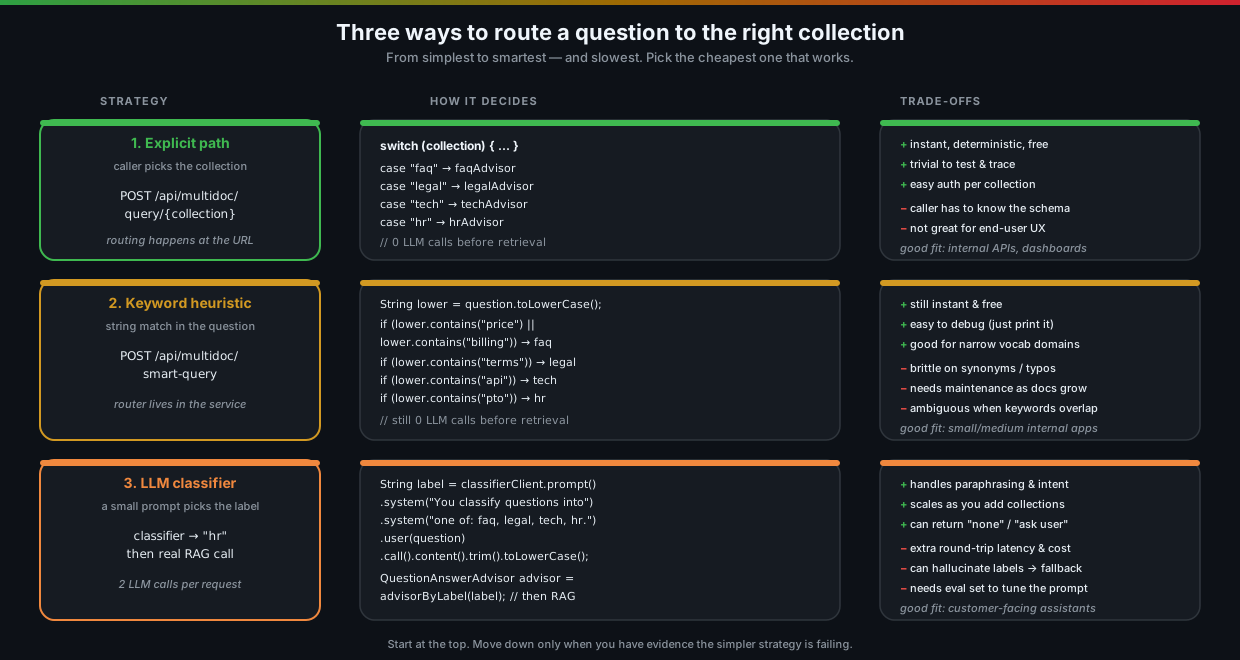
The third option — using a small LLM classifier — is one extra ChatClient call before the real RAG call:
String label = classifierClient.prompt()
        .system("""
                You classify a user question into exactly one of these labels:
                faq, legal, tech, hr.
                Reply with only the label, lowercase, no punctuation.
                """)
        .user(question)
        .call()
        .content()
        .trim()
        .toLowerCase();

QuestionAnswerAdvisor advisor = advisorByLabel(label); // with a fallback for unknown labels
You can sharpen this further by asking for a structured output like Routing(label, confidence, reason) and refusing to route when confidence is low — sending the user a clarifying question instead of a wrong answer.
The trade-off is real though: every request now pays for two LLM round trips instead of one. With qwen3:4b on a laptop that’s the difference between a snappy demo and a noticeably slow one. Don’t reach for the classifier until the keyword version has actually let you down.
6. Running the Demo
Same setup as the rest of the series — Postgres + pgvector + Ollama in Docker, Spring Boot on top:
docker compose up -d
./mvnw spring-boot:run
Notice we don’t ingest separately this time — the four collections are populated automatically by @PostConstruct when the app starts. Watch the logs for [INGESTION] All collections ready | faq | legal | technical | hr and you’re good to go.
List the available collections
curl -s http://localhost:8080/api/multidoc/collections | jq[
{ "name": "faq", "description": "Customer FAQ — pricing, features, support" },
{ "name": "legal", "description": "Terms of Service — legal agreements and policies" },
{ "name": "tech", "description": "API Documentation — REST endpoints and authentication" },
{ "name": "hr", "description": "HR Policies — PTO, benefits, conduct, compensation" }
]
This is the same descriptor you’d want a frontend dropdown, an SDK, or even an LLM tool description to consume. Make it part of your API.
Ask a specific collection
curl -s -X POST http://localhost:8080/api/multidoc/query/hr \
  -H "Content-Type: application/json" \
  -d '{"question": "How many PTO days do new employees get?"}' | jq
The retrieval logs ([→VectorDB] Similarity search | collection='hr' | ...) will show only the HR store being touched. The answer comes back grounded in HR policy chunks, with no billing or legal noise.
Try the same question against the wrong collection and see what happens:
curl -s -X POST http://localhost:8080/api/multidoc/query/legal \
  -H "Content-Type: application/json" \
  -d '{"question": "How many PTO days do new employees get?"}' | jq
You’ll get back something like “The provided legal documentation does not specify PTO entitlements for new employees.” That’s a feature, not a bug — the system is correctly refusing to invent an answer because the retrieved context (legal clauses) doesn’t support one. Compare that to the polluted single-store version, which would happily make something up.
Let the app route
curl -s -X POST http://localhost:8080/api/multidoc/smart-query \
  -H "Content-Type: application/json" \
  -d '{"question": "How much does the Professional plan cost?"}' | jq
{
"question": "How much does the Professional plan cost?",
"detectedCollection": "faq",
"answer": "The Professional plan is $79/month..."
}
Notice the detectedCollection field in the response — that’s the routing decision exposed to the caller. Always return it. When something goes wrong (“why did it answer with HR policy when I asked about an API?”), this field is the first thing you’ll look at.
Try a question with no obvious keyword:
curl -s -X POST http://localhost:8080/api/multidoc/smart-query \
  -H "Content-Type: application/json" \
  -d '{"question": "How do my time-off days work?"}' | jq
The keyword router falls through to the default (faq) and the answer is mediocre. That’s the moment the LLM classifier earns its keep — and the moment you can justify the extra round trip to your boss.
7. Things That Will Bite You
A short list, because none of them are showstoppers but all of them have ruined someone’s afternoon.
Re-ingestion on every startup
SimpleVectorStore is in-memory. Every app restart re-embeds every document. With qwen3:4b on CPU and four small text files that takes about 10–30 seconds. With a real document corpus and a hosted embedding model, that’s a slow startup and a non-trivial bill. Move to a persistent store (PgVectorStore, RedisVectorStore, etc.) before you ship.
One embedding model to rule them all
You can’t use text-embedding-3-small for the FAQ store and text-embedding-3-large for the legal store. The vectors live in different spaces, and even within the “same” provider the dimensionality and geometry are incompatible. Pick one embedding model for all your collections and treat changing it as a full re-ingestion event.
Keyword routers age badly
That if (lower.contains("api")) was crystal clear when you wrote it. Six months later someone adds a “Marketplace API” section to the customer FAQ, and now half your FAQ traffic gets routed to the technical docs. Treat your keyword router as code that needs tests, just like any other dispatcher. Keep a small file of (question, expected_collection) pairs and run them in CI.
LLM routers hallucinate labels
Ask the LLM to classify into faq, legal, tech, hr and it will, eventually, return "finance". Or "FAQ " (with a trailing space). Or a polite paragraph explaining why this question is interdisciplinary. Always parse defensively, lowercase, trim, and have a default. Better yet, ask for a structured output and validate it against an enum.
Don’t fan out “just in case”
A tempting pattern is to skip routing entirely and query all collections in parallel, then merge the top-K. It works. It also costs N times the embedding work and feeds the LLM a buffet of mixed context — exactly the pollution problem we set out to fix. Fan-out is sometimes the right answer (when the question really does span domains), but make it an explicit decision, not the default.
Auth scopes belong on collections, not on rows
Once your collections map to real domains, they often map to real permissions. “Sales reps can read FAQ + tech but not HR or legal.” Enforce that at the routing layer — refuse the request before you even hit the vector store. It’s much harder to bolt on later as a per-chunk metadata filter.
Token budget, not just retrieval, defines top-K
It’s tempting to crank topK up now that each store is more focused. Don’t go wild. Every retrieved chunk costs prompt tokens, and the LLM still has a context window. With four small focused stores, topK = 4 per call usually beats topK = 12 from a single bloated store. Measure, don’t guess.
8. When to Reach for This (and When Not To)
A short opinionated list because nobody needs another “it depends”.
Use multiple collections when:
- You have clearly distinct content domains (legal vs. tech vs. support).
- Different domains have different access controls.
- You’re seeing context pollution in your single-store top-K (irrelevant chunks beating relevant ones).
- Different domains need different retrieval settings (different chunk sizes, different
topK). - You want isolation — being able to re-ingest legal docs without re-embedding everything else.
Stick with one collection when:
- Your documents are already topically coherent (one product, one team, one knowledge base).
- The total corpus is small (a few thousand chunks) and similarity search “just works”.
- You don’t have an obvious way to label or route — you’d just be shuffling chunks into arbitrary buckets.
Consider the “one store + metadata filter” middle ground when:
- You want the operational simplicity of a single store but the precision of separate ones.
- Your vector store implementation has decent metadata filter support (most do — pgvector, Qdrant, Pinecone, etc.).
- You’ll cover this directly in the next post on metadata filtering.
9. Where This Sits in the Bigger Picture
Multi-document RAG is the first time in this series that the retrieval side of RAG starts looking like a real system rather than a single VectorStore reference. You’ve got multiple stores, a router, a fallback, an API surface — that’s infrastructure, not a demo.
It also sets up two patterns we’ll lean on later:
- Metadata filtering (next post) — the alternative implementation: one store, but every search is scoped by a metadata predicate. Less memory, more flexible filters, but you give up the per-collection isolation.
- Function calling (last post) —
searchFaq,searchLegal,searchTech,searchHrmake beautiful@Toolmethods. Let the LLM pick which one to call instead of writing your own router. That’s basically a multi-document RAG agent.
You can mix and match. A real production setup probably ends up with a handful of separate stores for the genuinely distinct domains, metadata filtering inside each store for finer slicing, and tool-style routing on top so the LLM can pick across them. None of that is more complex than what’s in this post — it’s the same ChatClient.prompt().advisors(...).call() recipe, just instantiated more thoughtfully.
10. Key Takeaways
-
Context pollution is the real enemy. Mixing unrelated documents in one vector store turns top-K into a lottery. Splitting by domain trades a bit of memory for a lot of relevance.
-
One store per domain, one shared embedding model, one cached advisor each. Build them in
@PostConstruct, never per request. Tag every chunk withsourceandcollectionmetadata for debugging. -
Routing is a separate concern from retrieval. Pick the cheapest strategy that works: explicit path → keyword heuristic → LLM classifier. Move down only when the simpler option demonstrably fails.
-
Always expose the routing decision in the response. A
detectedCollectionfield is the difference between a five-minute debug and a five-hour one. -
Treat collections as auth boundaries. Enforce access at the routing layer, not as a per-chunk metadata filter you’ll forget to apply.
-
Defaults matter when nothing matches. A keyword router with no match should default to a sensible collection (or a “sorry, can’t help” path) — not throw a 500 in front of your user.
Series Roadmap
| Post | Topic | What it adds |
|---|---|---|
| Post 1 | Basic RAG | End-to-end retrieval pipeline with QuestionAnswerAdvisor |
| Post 2 | Document Ingestion | Multi-format loading, custom chunk sizes, metadata enrichment |
| Post 3 | Vector Store Operations | Direct similarity search, threshold tuning, embedding inspection |
| Post 4 | Chat with Memory | Conversational RAG with per-session history and context carryover |
| Post 5 | Advisors | Composing RAG + memory + safety advisors in a pipeline |
| Post 6 | Structured Output | Extracting typed Java records from LLM responses |
| Post 7 | Function Calling | Letting the LLM invoke Java methods as tools |
| → You are here | Multi-Document RAG | Multiple document collections with smart routing |
| Post 9 | Metadata Filtering | Scoping vector search with metadata filters |
Source code: github.com/gdunhao/rag-spring-ai — clone it, run
make setup && make run, and open localhost:8080 for the interactive playground.